
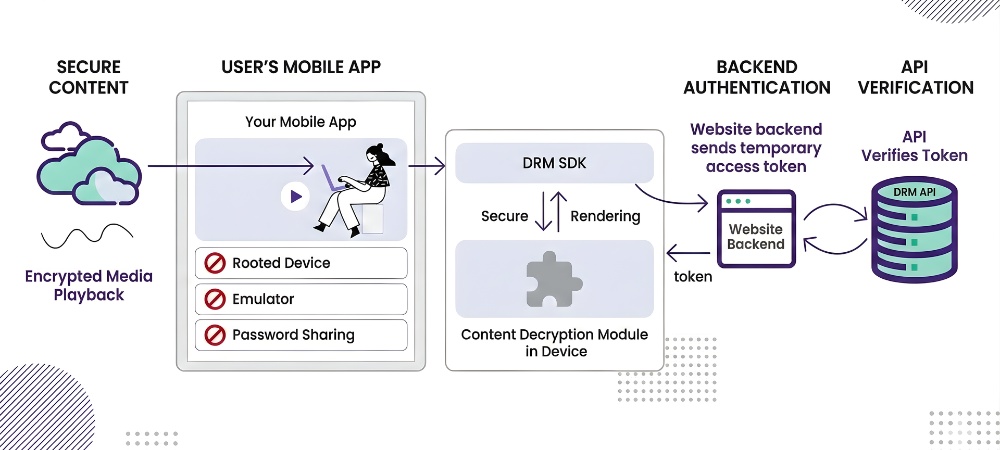
Whenever we start searching for means to protect copyrighted material, we find terms like DRM. But sources like Wikipedia tells us that, “Digital rights management (DRM) is the management of legal access to digital content. Various tools or technological protection measures, such as access control technologies, can restrict the use of proprietary hardware and copyrighted works.” Since videos are also digital content, let’s understand how this DRM can be used to protect it from unauthorized access.
Table of Contents:
- What is Video DRM?
- What are all DRMs available for Video Protection?
- How Does Video DRM Work?
- Why is Video DRM better than Standard Video Encryption?
- Why can DRMs blackBox the encryption key to enhance security but not Standard Encryption?
- What does Google, Apple do to maintain DRMs & Security?
- How can I integrate video DRM for my website/app?
- Video DRM Terminologies
What is Video DRM?
As the word ‘Digital Rights Management’ suggests, DRM is essentially a technical system to ensure that rights of the content are appropriately managed. If you have to make revenue from your digital content, say videos, it is critical that the content is only accessible to your actual subscribers or paid users. If there is a method by which non-subscribed/non-paid users get access to your content, then you are losing out on your revenue. In certain cases, your video content might be of private nature and thus it is also a privacy/copyright loss for individuals or businesses.
Video DRM is crafted to safeguard video media files from unauthorised access, replication, and distribution. The core of Video DRM lies in encryption, access control methodologies, a proprietary hardware-controlled environment, a software-enabled black box, and a dynamic key exchange management system & secure distribution, making DRM-protected video content available to only authorized users and devices. Video DRM typically works by encrypting the video file and using authorization from a trusted DRM license server before content playback. It can be implemented through various ways, including the use of softwares, hardwares or secure online video services like VdoCipher. This is a detailed blog where we explain everything about Video DRM (Digital Rights Management) in layman’s terms.
DRM can apply to any form of content, audio, video, ebook, games etc. but we will only cover video/audio DRM in this blog.
What are all DRMs available for Video Protection?
Since there are a multitude of devices, OS & browsers, it requires different DRM solutions to secure content. There are 3 common video DRMs namely Google Widevine, Apple Fairplay & Microsoft Playready. Google Widevine DRM & Apple Fairplay DRMs are the necessary ones to cover all key devices and browsers (laptop/desktop, android, IOS).
- Google Widevine DRM supports: Desktop/Laptop (Windows, Mac, Linux) Chrome, Firefox, Edge. Android Chrome, Edge, Android TV, Android TV, Chromecast.
- Apple Fairplay DRM supports: Mac Safari, IOS Safari, IOS App
- Microsoft Playready DRM supports: Edge in Windows. Windows Edge is also supported by Google Widevine, so Playready is not an absolute necessity.
How Does Video DRM Work?
Although implementations differ slightly across Google Widevine, Apple FairPlay, and Microsoft PlayReady, the overall workflow remains largely the same.
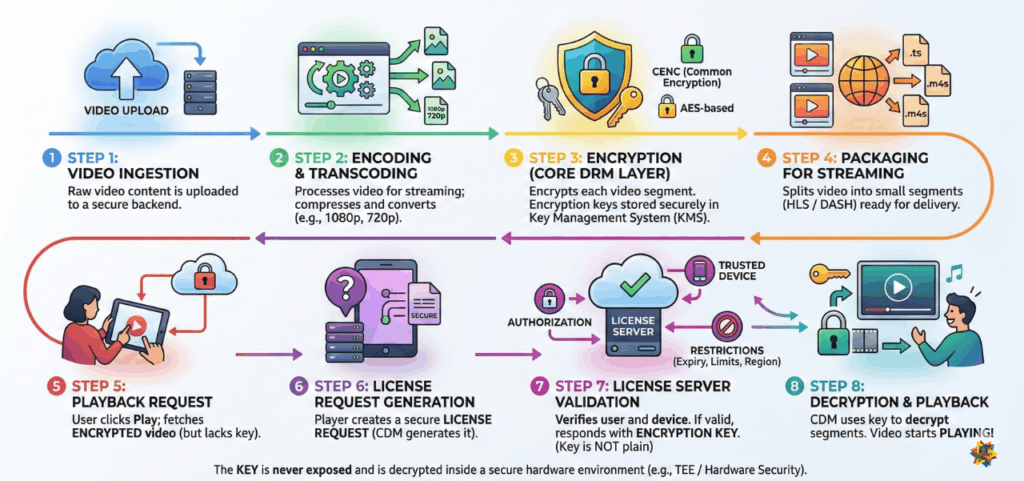
Step 1: Video Ingestion
The process begins with uploading the video content. The video is sent to a secure backend or video platform for processing
Step 2: Encoding & Transcoding
The uploaded video is processed to make it suitable for streaming like compressed formats and resolutions are created.
Step 3: Encryption (Core DRM Layer)
Each video segment is encrypted using DRM-compatible standards like:
- CENC (Common Encryption)
- CBCS / AES-based encryption
These are securely stored in backend systems (often called Key Management Systems – KMS).
Step 4: Packaging for Streaming (HLS / DASH)
After encryption, the video is prepared for streaming i.e. being split into small segments (.ts or .m4s).
Step 5: Playback Request from User
When a user clicks “Play”, the player fetches the encrypted video files but still do not have the decryption key.
Step 6: License Request Generation
The player now creates a secure license request. Different DRMs call this differently:
- Widevine – License Request
- FairPlay – SPC
- PlayReady – Challenge
But conceptually, all are the same.
Step 7: License Server Validation
The Video DRM license server receives the request and verifies:
- Is the user authorized?
- Is the device trusted?
- Are there any restrictions?
- Expiry time
- Playback limits
- Region/device restrictions
If valid: The server responds with an encryption key. The key is never exposed in plain form. It is decrypted inside a secure environment (CDM / hardware security)
Step 8: Decryption & Playback
Encrypted Video segments are downloaded and decrypted with the key and playback starts.
Why is Video DRM better than Standard Video Encryption?
In a usual case, video encryption is the process of converting video into a secure format so that viewers can not directly access the raw file.
For example,
A video file is nothing but a long sequence of bytes.
Each byte is just a number between 0–255, usually represented in binary (base-2) or hexadecimal (base-16).
Step 1: How a raw video byte looks
Let’s say we pick a small portion of a video file:
- In decimal: 123
- In binary: 01111011
- In hex: 0x7B
If you open a video file in a hex editor, you’ll see something like:
00 00 00 18 66 74 79 70 6D 70 34 32 ...
This is the actual raw structure of the video.
Step 2: What encryption does (AES example)
Now, suppose we encrypt this data using AES (Advanced Encryption Standard).
AES does not encrypt 1 byte at a time, it works on blocks of 16 bytes (128 bits).
Let’s take a simple 16-byte block:
Original Video Plaintext (16 bytes):

7B 2A 9C 4F 10 88 A1 3C 55 D2 01 FF 09 77 66 20
We also have a secret key (known only to the server and trusted systems):
Example Key:

A1 B2 C3 D4 E5 F6 07 18 29 3A 4B 5C 6D 7E 8F 90
Step 3: After AES encryption
AES transforms this block into something completely unreadable:
Encrypted Video Ciphertext:

E3 91 5F 2A 77 C8 4D 19 8B AA 02 6C F0 33 9D 71
Even if someone inspects the file, they will only see random-looking data.
After Encryption, the bytes no longer represent valid video structure and Media players cannot decode it. Even if someone downloads the file, it is useless without the key.
Video DRM also uses similar encryption but then why is it more secure?
The more secure thing now lies in how to hide the encryption key. In standard encryption this key can be found using network sniffer and similar tools but in case of DRM this key is hidden in a black-box environment created by device, OS, software owning giants like Google & Apple.
When a legitimate user presses play for DRM protected content:
- The video player requests a license from a DRM server
- The server verifies:
- Is the user authorized?
- Is the device trusted?
- If valid >> it sends the decryption key securely
- The player decrypts chunks in memory (not as a file)
- The video plays
Standard video encryption technologies like HLS E, RTMP E, AES 128 have weak key exchange mechanisms and are prone to hacking and downloading. This defeats the main purpose of encryption. This is where the DRM system comes in, DRM tools protect the encryption key preventing easy access by any hacker/plugin/software. Thus, DRM video encryption does the dual job of encrypting the video and secondly of protecting/black-boxing the video encryption key.
Why can DRMs blackBox the encryption key to enhance security but not Standard Encryption?
The reason is that Google, and Apple have some control over either your browser, OS, hardware, or all of these.
E.g Apple has control over iPhone and Mac in terms of hardware, OS, and specifically the Safari browser. Google has control over Chrome, Android & has partnered with Firefox, Edge to have basic control over them as well.
This control/access is authorized through Encrypted Media Extensions (EMEs) which are present on all device browsers.
Thus, Google and Apple Fairplay DRM can exercise more control and security for encrypted content.
Note that building a secure video streaming website involves implementing robust video security features. While DRM plays a critical role, it’s not foolproof. Find out why DRM is not enough to protect video piracy and how to enhance your content security.
Explore More ✅
Vdocipher helps several video Platforms with DRM Protection and to host their videos securely, helping them to boost their video revenues.
What does Google, Apple do to maintain DRMs & Security?
Google & Apple ensure the below things with DRMs. These technologies need to be updated over time else security becomes prone to vulnerabilities.
- Ensure that videos can not be downloaded via hack/plugin on any browser/app platform they play. This is applicable for all browsers and apps.
- Prevent screen capture in cases where it is possible. Since in certain cases, Google & Apple have OS-level control, they can prevent screen capture in Safari browser, Mobile Apps. But screen capture can not be prevented in most Chrome, firefox browser playbacks.
- Update technologies related to DRM, Encrypted Media Extension, and video streaming protocols to ensure that compatibility is maintained & security always stays maximum.
- Providing training and certification to its partners (like Google Widevine DRM partner) who ensure that customers across worldwide can avail and implement DRM easily. VdoCipher.com is one of Google Widevine DRM partner.
Example 1: While most chrome browsers can not prevent screen capture with Widevine DRM, but now there are certain Windows laptops that can prevent screen capture. Thus, it is an effort from Google and Apple to always update what best they can do in terms of security.
Example 2: Today Widevine DRM is supported well with Dash protocol. Tomorrow there might be future popular streaming protocols & those protocols & DRM need to ensure compatibility with each other.
How can I integrate video DRM for my website/app?
Implementing DRMs requires a change at 2 key places in video infrastructure. First is at the transcoding level, where content is encrypted with DRM parameters after transcoding. The second is in the video player level, where the encrypted content is decrypted to play the final video in a viewable format.
Very large enterprises like Netflix & Amazon Prime build in-house systems.
Many Large, medium & small businesses rely on VdoCipher who provide DRM software, video hosting, and video player as a combined offering in an easy to use offering to customers.
A summary of above explanation is summarised in the 2-minute video below.
Video DRM Terminologies
1. DRM
DRM stands for Digital Rights Management. It involves technologies and protocols meant to prevent content piracy and ensure that only the authorized user has access to the content. DRM usually is implemented for video, audio, games and e-book content.
2. Video DRM
Video DRM stands for the encryption and licensing protocols maintained by likes of Google and Apple to ensure piracy protection for videos playing on web browsers, mobile apps and Smart TVs. The two most popular DRM are Google Widevine and Apple Fairplay DRM.
Explore More ✅
With VdoCipher’s DRM security you can stream your videos securely. We ensure that your videos cannot be downloaded and you don’t lose your revenue to piracy.
3. DRM License
DRM license usually refers to an authentication mechanism to ensure restricted access of the content as per the required security protocols. For secure video playback, DRM license refers to the authentication system for playing an encrypted video in a device. In a typical DRM setup for online video streaming, 1 license is usually equal to 1 view.
4. DRM License Server
For DRM enabled Video playback, DRM license server means a server setup that sits in the center of the encoding + encryption system and the video playback system. This DRM license server authenticates each playback and ensures that the video plays as per the restriction rules imposed on it by the video platform.
5. DRM Compatibility
DRM compatibility is used to explain which browsers and devices support which DRM protocol and with what level of security. Few Examples –
- Google Widevine DRM is compatible with Chrome, Firefox, Edge browsers on Desktop and Android, Chromecast, Android TV. Android phone devices come with 2 levels of Google Widevine DRM security- Level L1 & Level L3. L1 devices are compatible for higher security features than L1.
- Apple Fairplay DRM is compatible with Mac Safari, IOS Safari & Apple TV.
6. Google Widevine DRM
Google Widevine DRM is the video security protocol build and maintained by Google for preventing video piracy in major browsers (Chrome, Firefox, Edge) , Android ,Android TV & Chromecast. It defines a method to encrypt, license, and decrypt videos in a secure mechanism to ensure videos can not be downloaded. It also ensures screen capture protection in Widevine L1 security level devices. VdoCipher is direct partner with Google for Widevine security implementation.
7. Apple Fairplay DRM
Apple Fairplay DRM is the video security protocol developed and maintained by Apple to prevent digital piracy, primarily for its own software and devices like Safari, iTunes, macOS, iOS, and Apple TV. It provides a method for the encryption, licensing, and decryption of video files in a secure manner to ensure they cannot be easily downloaded or copied without authorization. However, it doesn’t apply to major browsers (Chrome, Firefox, Edge), Android, Android TV, and Chromecast as it’s specific to Apple’s ecosystem. Similarly, it does not ensure screen capture protection on Widevine L1 security-level devices, which is a separate DRM system called Google Widevine for Android and Chrome.
8. DRM encryption
DRM playback involve encrypting videos with DRM protocols in addition to standard encryption. This encryption basically ensures high secure key exchange mechanism so that the key is never exposed and the content can not be decrypted by a hack. DRM provider like VdoCipher provides APIs for DRM encryption.
9. DRM decryption
DRM playback involve encrypting and decrypting videos with DRM protocols. After the encrypted stream transfer , the video player decrypts the DRM encrypted content back to a visual format allowing the viewer to watch the video. Most open source players like Exoplayer, Shaka Player have parameters for allowing DRM video decryption. DRM provider like VdoCipher provides APIs for DRM encryption and decryption.
10. DRM in Mobile Phones
All Android and IOS phones have an inbuilt mechanism to support DRM secure playback. Android devices support Google Widevine DRM while IOS devices support Apple Fairplay DRM security. Android devices are further categorized for Widevine security level L1 & L3 (L3 is lower secure of these 2). DRM presence in your phone devices allow you to play DRM supported content from popular media apps like Netflix, Amazon Prime, Hotstar & Hulu.
11. Offline DRM for videos
Offline DRM means when the secure content is viewed in an offline environment but it is still not prone to video piracy owing to implementation of offline DRM technology. A good example of offline DRM is offline secure download video playback in various movie apps; where a viewer can download video offline and watch it multiple times but can not extract the video out of app. VdoCipher provides offline DRM for App.
12. Chrome DRM
Google Chrome browser supports the security of online videos through Google Widevine DRM. This DRM ensures secure licensed decryption of videos in the Chrome browser and prevents video download attempted from any hacks, extensions or plugins etc. Chrome enables Widevine through CDM (Content Decryption Module). Chrome in Desktop (Windows, Mac, Linux), and Android both support Widevine DRM.
13. Firefox DRM
Mozilla Firefox browser supports the security of online videos through Google Widevine DRM. This DRM ensures secure licensed decryption of videos in the Firefox browser and prevents video download attempted from any hacks, extensions or plugins etc. Firefox enables Widevine through CDM (Content Decryption Module) which was integrated in partnership with Google. Firefox in Desktop (Windows, Mac, Linux), and Android both support Widevine DRM.
14. Edge DRM
Windows Edge browser supports the security of online videos through either Google Widevine DRM or Microsoft Playread DRM. DRM ensures secure licensed decryption of videos in the Edge browser and prevents video download attempted from any hacks, extensions or plugins etc. Edge in Desktop (Windows, Mac, Linux), and Android both support Widevine DRM.
Playready DRM is only supported in Windows Edge.
15. Safari DRM
Apple Safari browser supports the security of online videos through Apple Fairplay DRM. This DRM ensures secure licensed decryption of videos in the Safari browser and prevents video download attempted from any hacks, extensions or plugins etc. It also blocks screen capture in Safari browser.
16. iOS DRM Support
iOS devices—particularly the Safari browser and native iOS apps—support DRM-protected video playback using Apple’s FairPlay DRM. This native integration allows secure video streaming directly within the Apple ecosystem, ensuring that only authorized apps and browsers can decrypt and play protected content.
17. Apple FairPlay DRM
Apple FairPlay DRM is a proprietary Digital Rights Management system used to protect video content on Apple platforms. It enables:
- Licensed decryption of encrypted video content.
- Prevention of video download through hacks, browser extensions, or screen recorders.
- Restriction of playback only to secure environments like Safari or native iOS apps.
- Screen recording protection, which blocks screen capture attempts during playback.
This makes FairPlay an essential component for delivering Hollywood-grade secure streaming on Apple devices.
18. Windows DRM
Windows device supports two DRMs – Google Widevine DRM for Chrome, Firefox, Edge browsers and Microsoft Playready for Edge browser. These DRMs provide security from video piracy and enables premium video websites like Netflix to play and protect premium movies.
19. Android DRM
Google Widevine DRM can be considered as Android DRM. Android supports video security in online and offline videos through Google Widevine DRM. This DRM ensures secure licensed decryption of videos in the Chrome, Firefox, Edge browser on Android , Android Native App and prevents video download attempted from any hacks, extensions or plugins etc.
19. Multi DRM
Multi DRM means when different DRM technologies like Widevine DRM and Fairplay DRM are used to secure content across different devices and browsers. A DRM provider company like VdoCipher ensures that all compatible DRM are present and provide a secure smooth experience in all major browsers and devices.
20. DRM Authentication
DRM authentication for video streaming means authenticating a video playback based on the limitations imposed by the platform to ensure the video stays inside the website/app and can not be taken outside of it. A DRM encrypted video needs to be authenticated for final playback in player, and DRM authentication allow for it. DRM company VdoCipher provides DRM authentication APIs.
21. DRM Playback
Encrypted video transfer while following DRM protocols to ensure highest video protection from video download is called DRM playback. Course providers and Movie Platforms generally look for Video DRM company to provide them revenue protection through piracy protection.
22. HLS DRM
Apple Fairplay DRM can integrate with HLS Streaming to provide security in IOS and Mac devices. HLS encryption by default is not high secure due to week key exchange mechanism and adding a DRM player to top of it ensures maximum video security.
23. Dash DRM
Google Widevine DRM can integrate with Dash Streaming to provide security in Desktop and Android devices. AES 128 encryption by default is not enough secure due to a leaky key exchange mechanism and adding a DRM player to top of it ensures maximum video security. An example of Dash enabled DRM protected playback is VdoCipher homepage video.
24. Exoplayer DRM
Widevine DRM can integrate with playback in Exoplayer DRM to provide security in Android App. Widevine DRM enables both online and offline secure playback in Exoplayer. VdoCipher has an Android Video SDK which includes a DRM supported playback in Android player which is based on Exoplayer.
25. HTML5 DRM
Users do not want to install extension/software (e.g flash earlier) to play DRM protected content. Thus, html5 DRM allows the viewers to watch video content in normal html5 player in browsers while at same time ensuring that the content provider is able to provide a DRM encrypted video streaming to prevent video piracy.
26. DRM Video Player
An online video player that has integrated DRM APIs to ensure playback of DRM-protected content inside the player is called a DRM video player. DRM video player key function is to decrypt the encrypted stream using secure DRM keys and present the video content to viewer, ensuring highest security of videos from download.
27. CDM (Content Decryption Module)
A DRM secure playback is higher secure than the standard encrypted streaming technologies because of higher secure blackboxed key exchange mechanism. This would not have been possible without a CDM that comes preinstalled in browsers, thus CDM can be considered as a black-box in browsers/devices which ensures high secure DRM playback. E.g Google Chrome and Mozilla Firefox have Widevine CDM pre-installed in them.
28. Encrypted Media Extension (EME)
Encrypted Media Extensions is a JavaScript API that enables secure video streaming for premium videos in the browser. EME is important in how a DRM system works. EME API is a W3C-recommended standard, meaning that the streaming applications are interoperable across different browsers irrespective of the underlying DRM system.
29. Encoding
Encoding is the process of converting raw, uncompressed video data into a compressed digital format suitable for storage and playback. This is typically a lossy process, meaning some data is discarded to reduce file size while preserving acceptable quality.
For example, capturing a live video feed and compressing it into an MP4 (H.264) format is encoding.
30. Transcoding
Transcoding involves converting a video file from one encoded format to another. It typically includes:
- Decoding the original compressed file into an intermediate uncompressed format.
- Encoding it again into the desired output format or bitrate.
Transcoding is used when adapting a video for different devices, resolutions, or file sizes.
For example, a 1 GB FLV file can be transcoded into multiple MP4 files of different sizes (e.g., 1 GB, 700 MB, and 400 MB) for adaptive streaming or compatibility.
31. Netflix DRM
Netflix uses a combination of Widevine, Fairplay and Playready DRM to secure videos from piracy in Android, IOS , Desktop and Smart TVs. If a device has some issue with DRM settings/compatibility, then it may not be able to play the premium DRM protected videos in the device. Such compatibility issues are sometimes solvable with browser/OS updates and restarting the system.
32. DRM APIs
Premium Movie and Course Video Platforms look to integrate DRM APIs for a secure encryption of videos on DRM server and a smooth decrypted playback inside the player. Thus, 2 DRM APIs are essential Or a company like VdoCipher can package the DRMs together in a hosting & player offering to provide an easy integration through a single API or iframe or WordPress plugin.
33. Widevine DRM Levels
- L1: The highest level of protection, L1, requires that all content processing and cryptography operations are performed within a hardware based trusted execution environment on the device’s processor. This level ensures that the content is decrypted and rendered in a secure, tamper-resistant environment, offering the highest level of content protection against piracy, including preventing screen recording and capture.
- L2: This level offers a moderate security level where only cryptography operations are handled within the trusted environment. While it’s more secure than L3, it doesn’t provide as much protection as L1 because the content might be processed outside the trusted environment after decryption.
- L3: The lowest level of DRM protection, L3, means that content decryption occurs within the device’s main processor but outside of the trusted execution environment. This level is more susceptible to piracy, as it relies on software-based protection that can be more easily bypassed compared to hardware-based solutions.
34. Apple FairPlay DRM Levels
Apple FairPlay DRM does not use the L1, L2, and L3 classification. Instead, it provides a robust, hardware-based protection mechanism for content streamed on Apple devices. FairPlay DRM integrates tightly with iOS, macOS, and tvOS hardware to offer a high level of security, including preventing screen capture and unauthorized content access.
35. Common Encryption Used in DRM Systems
| DRM Provider | Encryption Standard(s) Used | Notes |
| Google Widevine | AES-128 CTR (Counter mode) | Common in DASH (CENC). Used for both L3 (software) and L1 (hardware). |
| Apple FairPlay | AES-128 CBC (Cipher Block Chaining) | Encrypted HLS segments. Key and IV fetched securely. |
| Microsoft PlayReady | AES-128 CTR, CBC, and proprietary formats | Supports CENC; often used in Smooth Streaming or DASH. |
| Marlin DRM | AES-128 | Uses AES in different modes, depending on implementation. |
Video Explaining VdoCipher DRM for your videos. VdoCipher provides Google Widevine & Apple Fairplay DRM to secure videos from piracy.