
YouTube is “just video” the way an iceberg is “just ice.” The visible part is a player and a progress bar. Underneath lies one of the world’s most sophisticated distributed systems: a YouTube tech stack powering 2.5 billion users with Google’s global CDN (3,000+ edge locations), adaptive streaming protocols (DASH and HLS), horizontal database sharding via Vitess, Bigtable storage handling petabytes daily, and a two-stage machine learning recommendation engine that processes billions of interactions in real-time.
This technical deep-dive reveals YouTube architecture, from upload pipelines and video transcoding to content delivery networks and neural network recommendations. You’ll learn how YouTube CDN delivers videos at scale, why YouTube uses both HLS and DASH protocols, how the recommendation system filters billions of videos to surface the perfect 20, and the system design patterns that enable planetary-scale video streaming.
Table Of Content:
-
- What Tech Stack Does YouTube Use?
- YouTube Architecture: How YouTube Scales 2.5B Users
- How Does YouTube CDN Work? (3,000+ Edge Locations)
- YouTube HLS vs DASH: Which Protocol Does YouTube Use?
- YouTube Upload Pipeline: From Creator to 2.5B Viewers
- How Does YouTube Recommendation System Work?
- YouTube Observability: Monitoring 2.5B Users in Real-Time
- How YouTube Content ID Works (Copyright Detection System)
- Frequently Asked Questions
- Key Takeaways
- Sources
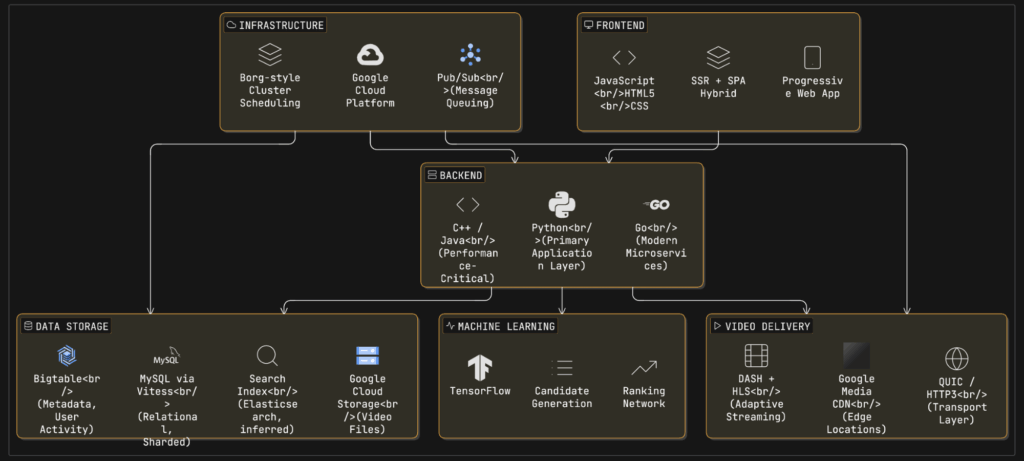
What Tech Stack Does YouTube Use? (Confirmed Components)
Frontend:
- JavaScript, HTML5, CSS
- Server-side rendering (SSR) + Single-page application (SPA) hybrid
- Progressive Web App architecture
Backend:
- Python (primary application language)
- C++ and Java (performance-critical operations)
- Go (modern microservices)
Data Storage:
- MySQL via Vitess (relational data, horizontal sharding)
- Bigtable (NoSQL for metadata and user activity)
- Google Cloud Storage (video files)
- Elasticsearch (search indexing, inferred)
Video Delivery:
- Google Media CDN (3,000+ edge locations)
- DASH and HLS (adaptive streaming protocols)
- QUIC/HTTP3 (transport layer)
Machine Learning:
- TensorFlow (recommendation training)
- Two-stage neural networks (candidate generation + ranking)
Infrastructure:
- Google Cloud Platform
- Borg-style cluster scheduling
- Pub/Sub (message queuing)
A useful definition: YouTube Tech Stack = the end-to-end system that turns an uploaded file into low-latency playback plus discovery (recommendations). That includes ingest and processing, storage and distribution, playback, discovery, and operations.
YouTube, the world’s largest video platform serving over 2.5 billion logged-in monthly users, operates one of the most sophisticated distributed systems ever built. However, much of YouTube’s internal implementation remains proprietary. What we know comes from official Google engineering blogs, research papers, developer documentation, and open-source projects like Vitess (YouTube’s MySQL scaling solution).
The youtube tech stack encompasses frontend technologies (JavaScript, HTML5), backend languages (Python, C++, Java, Go), data stores (MySQL via Vitess, Bigtable, Google Cloud Storage), video delivery infrastructure (Google Media CDN with 3,000+ edge locations (Data Source), and machine learning systems (TensorFlow for recommendations).
What’s public:
- YouTube publishes creator-side guidance on encoding and live ingestion settings -(Official Google Reference)
- Google publicly documents parts of its edge caching footprint (Google Global Cache) – (Data Source)
- YouTube researchers published foundational papers on the recommendation system – (Source: Research Paper)
- Streaming protocols like HLS and MPEG-DASH are standardized [RFC 8216, ISO/IEC 23009-1]
What’s not public:
- Exact internal service boundaries, storage engines per workload, cache eviction policies, and real-time ranking feature sets
VdoCipher helps several VOD and OTT Platforms to host their videos securely, helping them to boost their video revenues.
YouTube Architecture: How YouTube Scales 2.5B Users
YouTube follows a microservices architecture built on Google Cloud Platform infrastructure. When you hear “microservices,” don’t picture a neat diagram. Picture a messy graph that evolved for 15+ years, optimized for blast-radius control and independent deployability (that’s basically how every mega-scale distributed system ends up).
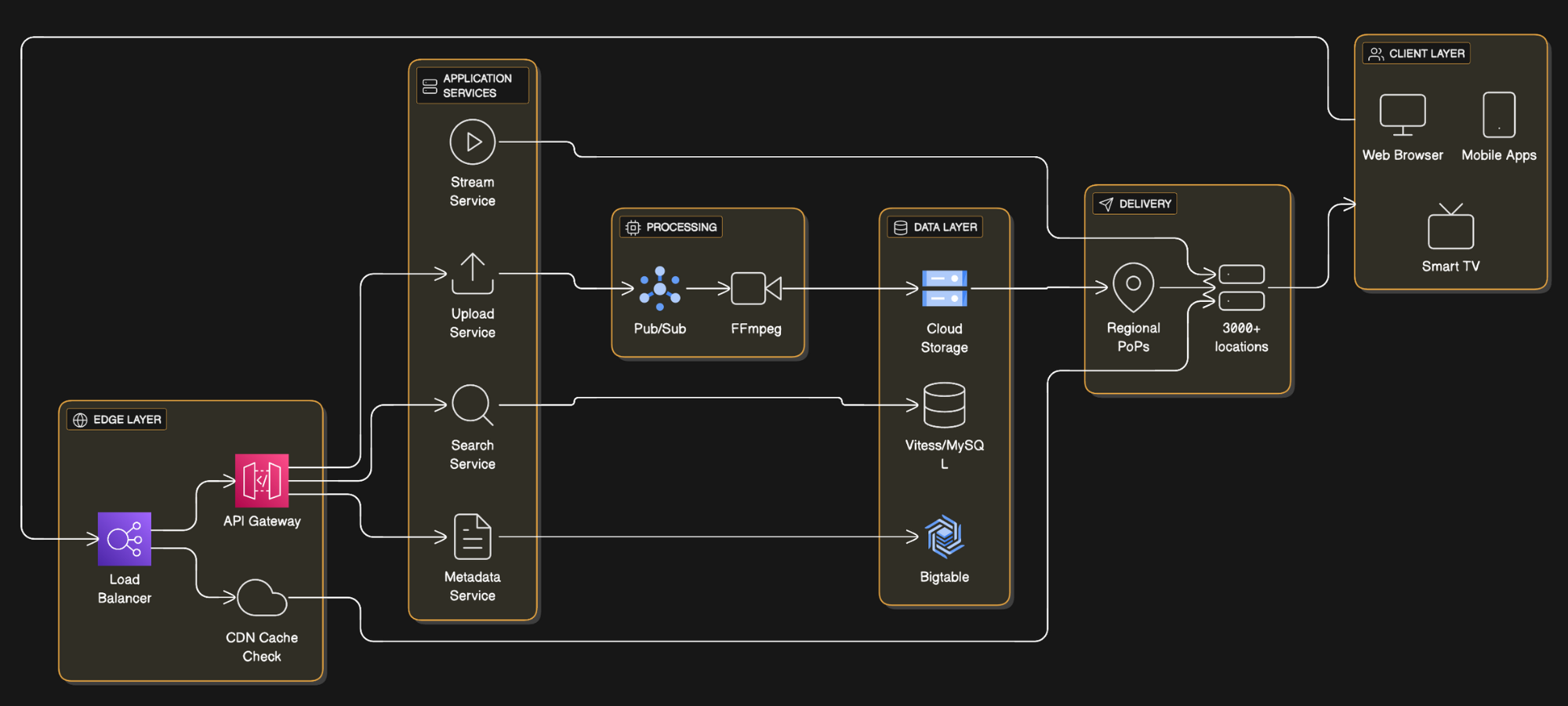
Frontend Layer: HTML5, CSS, JavaScript delivered via server-side rendering (SSR) for initial page load, then single-page application (SPA) behavior for navigation. This hybrid approach optimizes both SEO and user experience.
Backend Services: Python remains the primary application language due to rapid development velocity. Google’s internal documentation mentions using Python for most business logic, with C++ and Java for computationally intensive operations like video processing.
Data Layer:
- MySQL (via Vitess for horizontal sharding) stores relational data like user accounts and subscriptions (Source)
- Bigtable handles massive-scale metadata, user activity logs, and video metadata
- Google Cloud Storage hosts raw video files and transcoded renditions
Message Queue: While not publicly confirmed, YouTube most likely uses Google Cloud Pub/Sub or an internal equivalent for asynchronous task processing (transcoding jobs, notification dispatch).
Not publicly confirmed, most likely approach is: YouTube runs on Google’s internal compute orchestration and storage primitives (Borg-style scheduling, Dapper-style tracing, Spanner-style globally distributed transactions where needed) because YouTube is a core Google property and benefits from the same reliability and efficiency wins described in Google’s systems papers. (Read the Google Research)
How Does YouTube CDN Work? (3,000+ Edge Locations)
At YouTube scale, the youtube cdn is not a single CDN, it’s a delivery strategy: put bytes close to users (edge caches), route each request to a good edge (latency, congestion, availability), and fall back gracefully when an edge or region is unhappy.
1. Browser requests video: User clicks play, browser fetches manifest file (DASH MPD or HLS m3u8 playlist) containing available quality levels and segment URLs.
2. Request routes to nearest edge: Load balancer uses geographic routing and latency measurements to direct the request to the closest edge server from 3,000+ global locations.
3. Edge serves from cache or fetches: If the video segment is cached (98.5-99% hit rate), edge serves from memory/disk. On cache miss, edge fetches from regional cache or origin storage.
4. Adaptive streaming kicks in: Player downloads segments and continuously measures bandwidth, switching quality levels dynamically to prevent buffering.
The youtube CDN infrastructure is critical to delivering billions of video views daily with minimal latency. YouTube uses Google Media CDN, which leverages the same infrastructure as YouTube itself. (Official Google Reference)
Confirmed CDN Architecture
Google Media CDN spans over 3,000 edge locations globally (Supporting Source). The system achieves:
- Cache hit ratios of 98.5-99% for VOD (Video on Demand)
- Cache hit ratios of 96.5-98.5% for live streaming
- Over 100 Tbps of egress capacity (Data Source)
The public piece: Google Global Cache (GGC). Google documents Google Global Cache as cache infrastructure deployed in or near ISP networks to serve Google content more efficiently, reducing latency and transit (Official Google Reference).
Three-Tier Cache Hierarchy
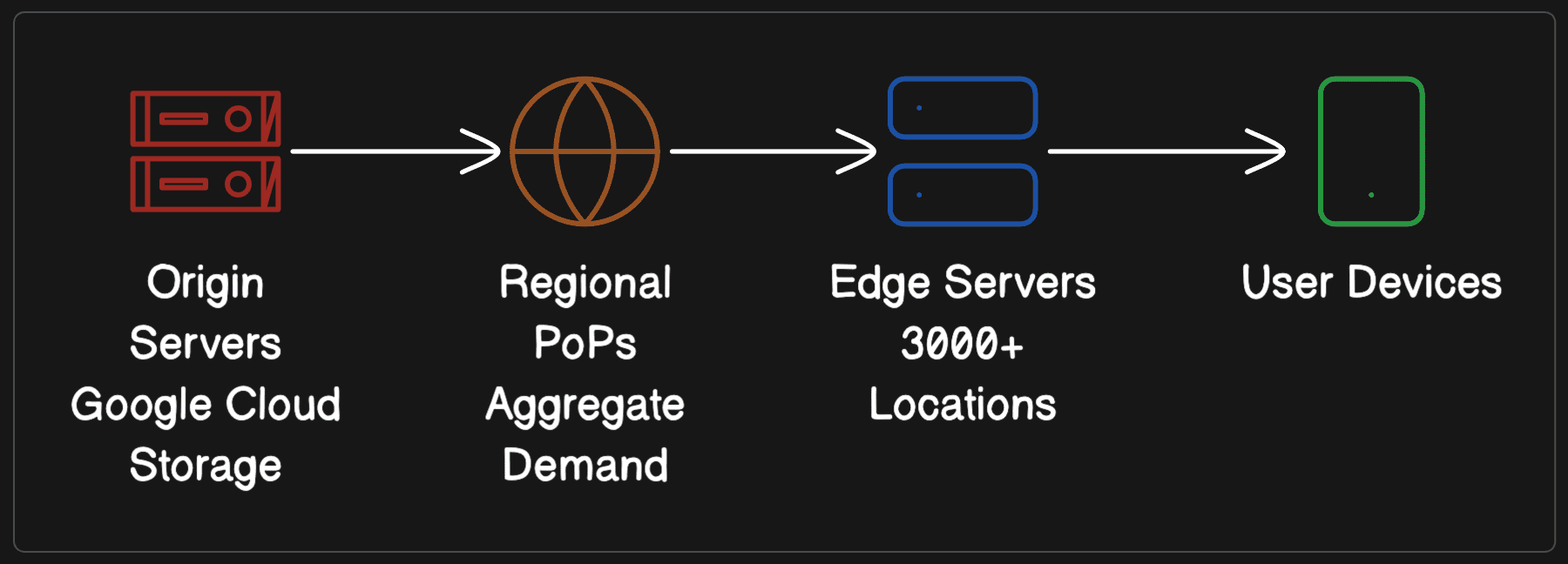
When a user requests a video:
- Browser fetches manifest file (DASH MPD or HLS m3u8)
- Player requests video segments from nearest edge server
- If cache miss, edge fetches from regional cache
- If still a miss, regional cache pulls from origin
QUIC/HTTP3 Transport Layer
Modern YouTube heavily relies on QUIC (HTTP/3) for video delivery over UDP to reduce buffering. QUIC eliminates TCP’s head-of-line blocking and reduces connection establishment latency [RFC 9000]. Google’s QUIC deployment paper discusses large-scale deployment including YouTube use cases, showing 30% reduction in rebuffering on mobile networks (Source: Chromium Projects).
Common Misconceptions
Misconception 1: “YouTube uses a single global CDN.” Reality: YouTube uses a multi-CDN strategy, including Google’s own infrastructure plus commercial CDN partners for redundancy during traffic spikes.
Misconception 2: “All videos are cached everywhere.” Reality: Cache placement is dynamic. Popular videos are proactively distributed; unpopular videos are pulled on-demand and cached based on regional interest.
Misconception 3: “The youtube cdn is just Cloud CDN.” Reality: Cloud CDN uses Google’s edge network, but YouTube’s delivery stack is a first-party product path with its own policies and telemetry loops. The shared idea is “serve from edge points,” not “identical implementation.”
Misconception 4: “If a user buffers, it’s always the CDN.” Reality: Client CPU, radio conditions, and player buffer policy can be the real culprit. A ton of failures are cache fragmentation, request steering, TLS/transport quirks, or client ABR oscillation.
Recommended Reading
Recommended Reading
YouTube HLS vs DASH: Which Protocol Does YouTube Use?
YouTube supports two primary adaptive bitrate (ABR) streaming protocols: MPEG-DASH and HLS (HTTP Live Streaming).
YouTube DASH Implementation
DASH (Dynamic Adaptive Streaming over HTTP) is YouTube’s primary protocol for non-Apple devices (Source: YouTube Documentation).
Confirmed specifications:
- Uses ISO BMFF (MP4) or WebM containers
- Segment duration: 1-5 seconds recommended
- Supports H.264, VP9, and AV1 codecs
- Media Presentation Description (MPD) updated every 60 seconds minimum during live streams
- Initialization segments limited to 100KB maximum
YouTube HLS Implementation
HLS is used for Apple devices (iOS, macOS, tvOS) where DASH is not natively supported (Source: YouTube Documentation).
Confirmed specifications:
- Uses MPEG-2 TS or fragmented MP4 containers
- Segment duration: 6-10 seconds typical (longer than DASH)
- Supports H.264 and HEVC (H.265) codecs
- Manifest format: text-based m3u8 playlists [RFC 8216]
HLS vs DASH comparison:
| Feature | DASH | HLS |
|---|---|---|
| Standard | ISO/MPEG | Apple proprietary |
| Codec support | Agnostic (H.264, VP9, AV1) | H.264, H.265 primarily |
| Segment length | 1-5 seconds | 6-10 seconds |
| Browser support | Chrome, Firefox, Edge | Safari (native), others via JS |
| Adaptation speed | Faster (shorter segments) | Slower (longer segments) |
Adaptive Bitrate Streaming (ABR): The Control Loop
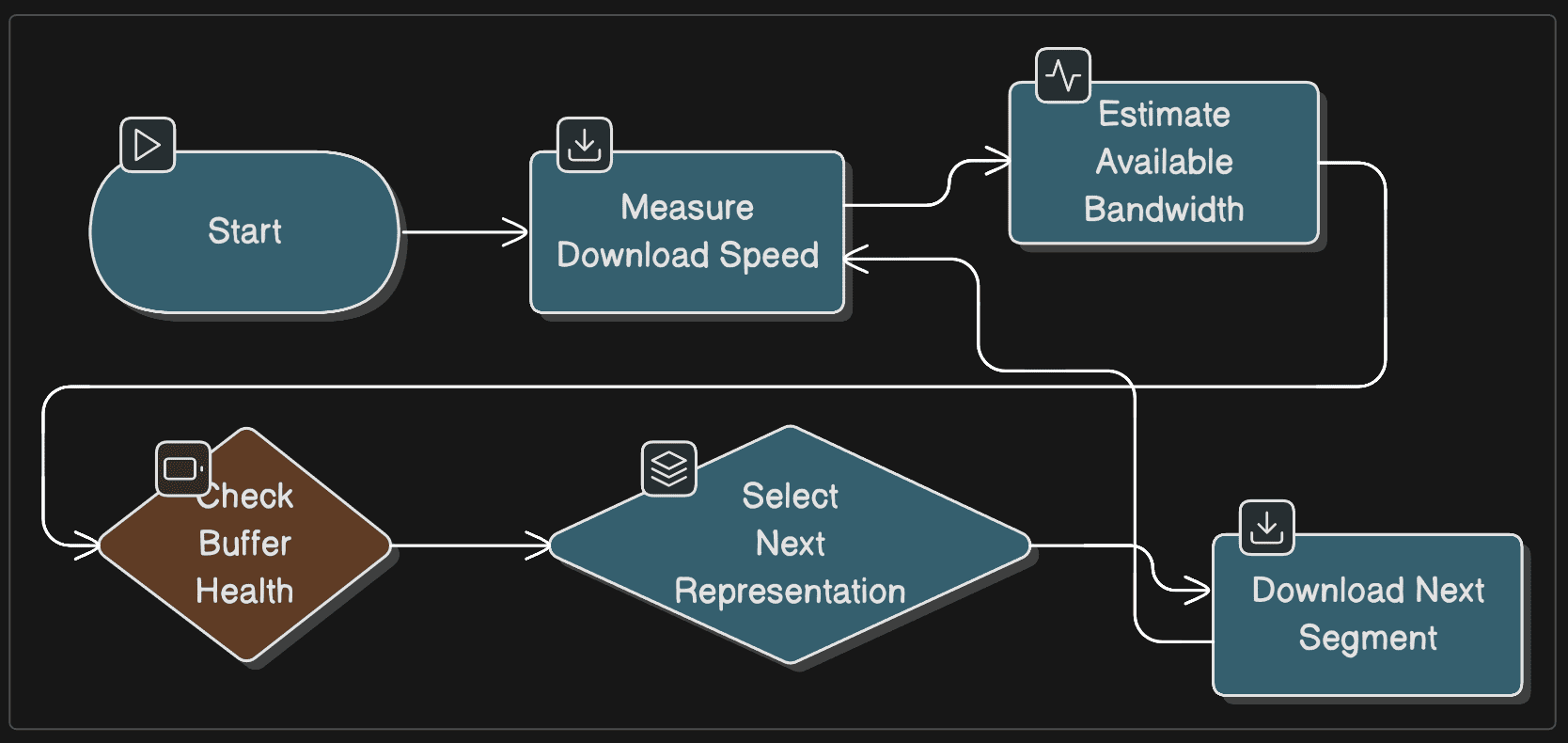
ABR is a loop, not a one-time decision:
- Measures download speed for current segment
- Estimates available bandwidth using exponential moving average
- Selects next segment quality to maximize resolution while preventing rebuffering
- Implements buffer-based decision logic (switch up if buffer > 30s, switch down if buffer < 10s)
HLS and DASH differ mostly in manifest format and ecosystem conventions, not in the core ABR control loop.
YouTube Upload Pipeline: From Creator to 2.5B Viewers
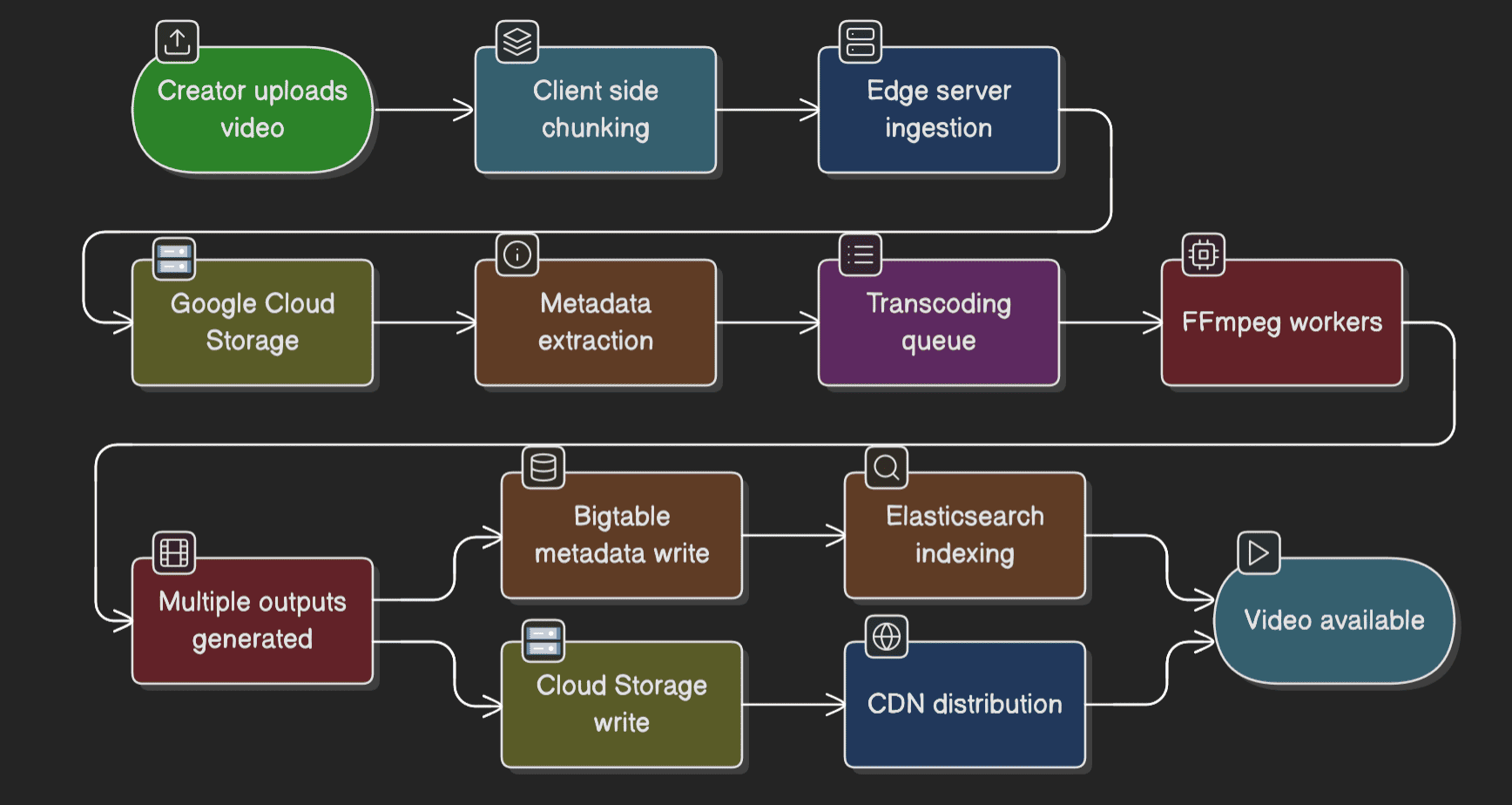
Step 1: Client-side chunking User initiates upload from browser or mobile app. Large videos are split into chunks (typically 10-50MB each) to enable resume capability and parallel uploads.
Step 2: Edge server ingestion Chunks are uploaded via HTTPS to the nearest Google edge server, minimizing latency. Upload goes directly to Google Cloud Storage.
Step 3: Metadata extraction Upon upload completion, YouTube extracts:
- Video duration, resolution, codec
- Audio properties
- Thumbnail frames (generated at 1-second intervals)
Step 4: Transcoding queue A message is published to a distributed queue (likely Google Cloud Pub/Sub). Stateless transcoding workers pick up the job.
Step 5: Parallel transcoding Using FFmpeg (open-source, confirmed by technical blogs), YouTube generates:
- Multiple resolutions: 144p, 240p, 360p, 480p, 720p, 1080p, 1440p, 2160p (4K), 4320p (8K for select content)
- Multiple codecs: H.264 (baseline), VP9, AV1 (for supported clients)
- Multiple bitrates per resolution: E.g., 720p at 1.5 Mbps, 2.5 Mbps, 4 Mbps
Step 6: Storage and indexing Transcoded renditions are written to Google Cloud Storage. Metadata is written to Bigtable. Video becomes searchable via Elasticsearch indexing (inferred from industry practice).
Need help? 💬
Reach out to our support team via chat, and our team will do their best to resolve any questions you have.
How Does YouTube Recommendation System Work?
The youtube recommendation system drives over 70% of watch time on the platform. Its architecture is detailed in the seminal 2016 paper “Deep Neural Networks for YouTube Recommendations” by Covington et al. (Research Article).
The YouTube recommendation system works in two stages:
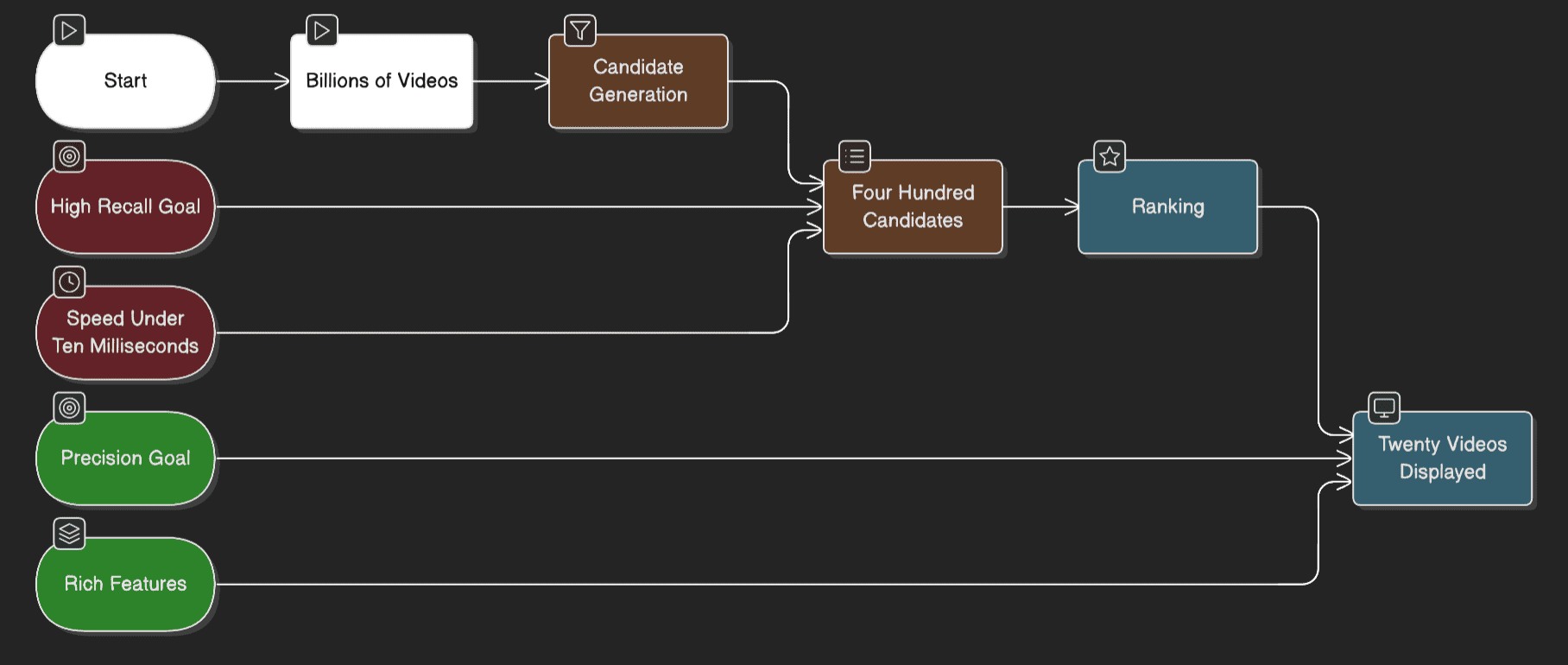
Stage 1: Candidate Generation (Recall)
- Input: Billions of videos in YouTube’s catalog
- Process: Neural network filters based on user history, search queries, and demographics
- Output: ~400 relevant video candidates
- Speed: <10 milliseconds
- Goal: High recall (don’t miss good videos)
Stage 2: Ranking (Precision)
- Input: ~400 candidates from stage 1
- Process: Deep neural network scores each video using hundreds of features (watch time, user-channel interaction, previous impressions)
- Output: ~20 videos displayed to user
- Speed: 50-100 milliseconds
- Goal: Precision (rank the absolute best videos first)
Why this two-stage approach? You cannot run a complex ranking model on billions of videos in real-time. The funnel architecture allows fast retrieval (stage 1) followed by expensive scoring (stage 2) on a manageable number of candidates.
Why Two Stages?
The answer is pure engineering pragmatism:
- Candidate generation must be fast and recall-heavy (find hundreds from billions in <10ms)
- Ranking can be slower and feature-rich because it runs on fewer items
If you only remember one thing: retrieval and ranking are separate problems, and that separation is a big reason the system can scale.
Two-Stage Architecture
Stage 1: Candidate Generation Network
Objective: Filter billions of videos down to hundreds of relevant candidates quickly (latency budget: <10ms).
Model architecture:
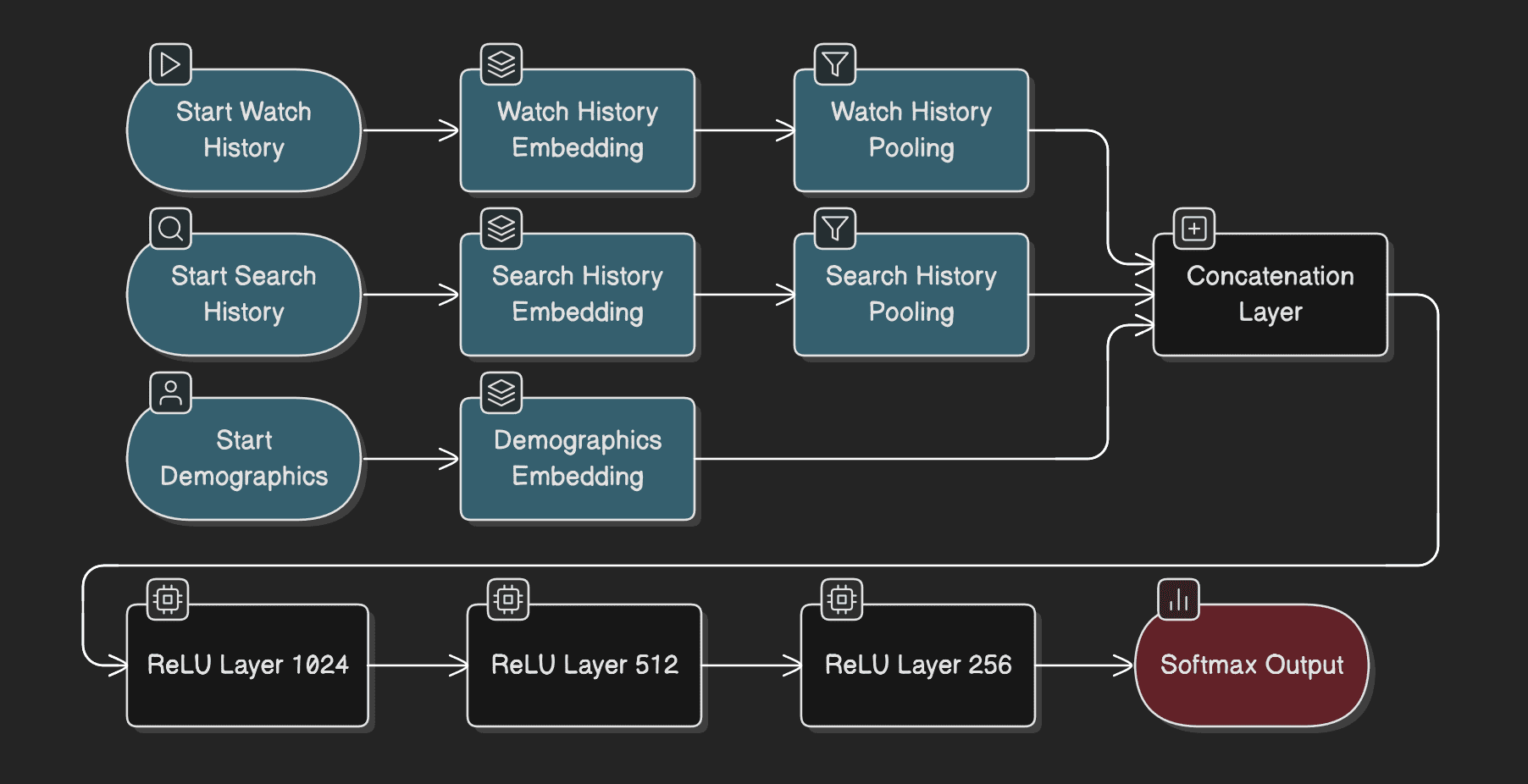
Neural network with embeddings for:
- Video IDs, search tokens, user demographics
- User watch history represented as averaged embeddings (each video mapped to 256-dimensional vector)
- Search history tokenized into unigrams/bigrams, also averaged
- Demographic features (age, gender, location) embedded and concatenated
- Feedforward network with ReLU activations: 1024 → 512 → 256 units
Training approach:
- Formulated as extreme multiclass classification: predict which video user will watch next from millions of options
- Uses negative sampling to make training tractable (samples thousands of negative examples)
- Candidate sampling with importance weighting
Key features:
- Example Age: Time since video upload, included as a feature to promote fresh content [confirmed in paper, Section 3.3]
- Watch history: User’s previously watched video IDs
- Search history: Recent search queries
- Geography and device: Embedded categorical features
Critical design choice: The model predicts the next video a user will watch, not a randomly held-out video. This captures asymmetric viewing patterns (e.g., users watch episodic content sequentially) [confirmed in paper, Figure 5].
Stage 2: Ranking Network
Objective: Assign precise scores to hundreds of candidates, ranking them by expected watch time.
Model architecture:
- Similar feedforward architecture to candidate generation
- Hundreds of features (categorical and continuous)
- Logistic regression output layer
- Hidden layers: 1024 → 512 → 256 ReLU units [confirmed in paper, Table 1]
Training objective:
- Weighted logistic regression: Positive examples (clicked videos) weighted by observed watch time; negative examples (impressions not clicked) given unit weight
- This learns expected watch time rather than click probability [confirmed in paper, Section 4.2]
Key features:
- Video ID: Embedded representation of the video being scored
- User’s past interaction with channel: How many videos from this channel has user watched?
- Time since last watch: Temporal features
- Number of previous impressions: How often has this video been shown to the user?
- Source that nominated candidate: Which candidate generator surfaced this video?
Feature engineering insight: “The most important signals are those that describe a user’s previous interaction with the item itself and other similar items” [confirmed in paper, Section 4.1].
Explore More ✅
With VdoCipher, stream live content in HD and offer your viewers the ability to choose their quality level. Embed the player seamlessly into your platform and redefine the live streaming experience.
YouTube Observability: Monitoring 2.5B Users in Real-Time
At YouTube’s scale, you don’t “monitor servers” – you monitor user experience and system health across billions of concurrent sessions. Operating a video platform serving 2.5 billion logged-in users requires comprehensive observability to detect, diagnose, and resolve issues before they cascade into user-facing failures.
While YouTube’s exact monitoring dashboard is proprietary, the observability principles and metrics categories are standard across large-scale video platforms and confirmed through industry research on Quality of Experience (QoE) measurement. standard quality of experience (QoE) metrics include:
Client-Side Metrics: Quality of Experience (QoE)
YouTube prioritizes playback quality metrics because they directly impact engagement and retention.
Key QoE metrics:
- Video Start Time (VST): Time from play click to first frame. Target: <2s at P95. Includes manifest fetch, initial segment download, and player init. Research shows rebuffering drives higher abandonment than slow starts.
- Rebuffering ratio: Percentage of watch time spent buffering. Target: <1%. Even brief mid-play stalls sharply increase abandonment.
- Bitrate distribution: Share of users at each quality level. Reveals regional bandwidth constraints and guides CDN and protocol tuning.
- Frame drop rate: Indicates client decoding stress, often due to heavy codecs or low-end hardware.
- ABR switches: Excessive quality changes (>5 per minute) signal unstable networks or poorly tuned adaptation logic.
Server-Side Metrics: Infrastructure Health
- Cache hit ratio: Portion of segments served from edge. YouTube reportedly sustains ~98.5–99% for VOD. Small drops cause large origin load and latency spikes.
- TTFB: Edge response latency. Target: <200ms P95. Degradation points to overload or routing issues.
- Origin request rate: Spikes indicate cache misses or viral surges.
- Bandwidth per PoP: Uneven usage highlights routing inefficiencies or demand shifts.
Transcoding pipeline
- Queue depth: Persistent growth signals capacity shortages or upload spikes.
- Processing latency (P95, P99): Long tails delay creator workflows.
- Failure rate: Target <0.1% to preserve creator trust.
- Cost per minute: VP9 and AV1 are significantly more CPU-intensive than H.264, shaping codec rollout decisions.
Databases
- Query latency (P95): Target <10ms for hot paths.
- Shard QPS balance: Skew indicates hot partitions.
- Replication lag: Target <1s to avoid stale user state.
Distributed Tracing and Incident Response
Not publicly confirmed, most likely approach is YouTube uses internal tracing systems similar to Google’s Dapper to correlate latency across services.
Each playback request propagates a trace ID across the stack:
API gateway → metadata service → CDN edge → player
This allows engineers to pinpoint failures, such as slow metadata reads combined with edge cache misses.
Critical alerts trigger on:
- VST P95 > 3s
- Rebuffering > 2%
- Cache hit ratio < 95%
- Transcoding queue depth > 10k jobs
- Database P99 latency > 100ms
On-call escalation is likely handled via tiered alerting and automated routing to service owners.
How YouTube Content ID Works (Copyright Detection System)
YouTube faces constant challenges in security, abuse, and copyright enforcement. Security and abuse prevention touches every layer. Public information is limited, but confirmed systems include:
Content Moderation
- Content ID: Automated copyright detection system that matches uploaded videos against reference database (Source: YouTube Documentation)
- Machine learning classifiers: Detect policy violations (violence, hate speech, spam)
- Human reviewers: Scale to thousands of reviewers globally.
Important nuance: Content ID is not “perfect copyright truth,” it’s an automated matching and policy system, and YouTube’s public docs focus on how claims work and what actions may result.
DRM and Encryption
- HTTPS delivery: All video delivery uses TLS 1.3
- Widevine DRM: For premium content (YouTube TV, movies) [industry standard on Google platforms]
- Token-based authentication: Video URLs include signed tokens that expire after set duration
- Encrypted Media Extensions (EME): Playback protection relies on standardized browser APIs
Abuse Prevention
- Rate limiting: API and upload endpoints throttled per user/IP
- CAPTCHA challenges: For suspicious activity patterns
- Account restrictions: Strikes for policy violations, escalating to channel termination
Frequently Asked Questions
What programming languages does YouTube use?
YouTube primarily uses Python for backend application servers and business logic due to rapid development velocity. C++ and Java handle performance-critical operations like video transcoding and real-time processing. Go powers modern microservices requiring efficient concurrency. The frontend uses JavaScript, HTML5, and CSS with a hybrid server-side rendering (SSR) and single-page application (SPA) architecture.
How much storage does YouTube use?
YouTube stores over 1 exabyte (1,000 petabytes) of video data, with approximately 720,000 hours of video uploaded daily. Each video is transcoded into 8-10 different resolutions and codecs, multiplying storage requirements. Back-of-envelope calculation: 720,000 hours/day × 6 videos/hour × 2GB = 8.64 petabytes of new storage daily. YouTube uses Google Cloud Storage with multi-region replication.
How does YouTube handle 500 hours of uploads per minute?
YouTube handles massive upload volume through horizontal scaling and asynchronous processing. Uploads are chunked (10-50MB pieces) and sent to the nearest edge server. Raw files land in Google Cloud Storage, triggering messages in Pub/Sub queues. Stateless FFmpeg transcoding workers running on thousands of instances process jobs in parallel.
What’s the difference between YouTube’s HLS and DASH streaming?
YouTube uses MPEG-DASH as the primary protocol for web browsers (Chrome, Firefox, Edge) and HLS for Apple devices (iOS, Safari). DASH uses 1-5 second segments with H.264/VP9/AV1 codec support. HLS uses 6-10 second segments with H.264/HEVC support. DASH’s shorter segments allow faster quality adaptation, reducing rebuffering by up to 30% on mobile networks.
How does the YouTube CDN work?
The YouTube CDN delivers video segments from edge servers located close to viewers to minimize latency and buffering. When a user presses play, requests are routed to the nearest healthy edge cache. If a segment is not cached, it is fetched from a regional cache or origin storage and then cached for future requests. High cache hit ratios allow YouTube to serve billions of views daily with low latency.
Key Takeaways
- YouTube’s tech stack is a hybrid of open-source and proprietary technologies, with MySQL (via Vitess), Bigtable, Python, and TensorFlow confirmed as core components.
- The youtube cdn leverages Google’s global edge network with 3,000+ locations, achieving 98.5-99% cache hit ratios through intelligent three-tier caching. QUIC/HTTP3 transport reduces rebuffering by 30% on mobile networks.
- YouTube uses DASH as the primary streaming protocol for adaptive bitrate delivery, with HLS reserved for Apple devices. Segment lengths of 1-5 seconds (DASH) enable fast quality switching. Codec choice matters: VP9 saves 30-40% bandwidth vs H.264, AV1 saves 50-60% but costs 50-100x more to encode.
- The youtube recommendation system employs a two-stage architecture: candidate generation (filter billions to hundreds in <10ms) and ranking (score hundreds to display ~20 with rich features).
- Expected watch time is the primary optimization metric, not click-through rate, to avoid clickbait and maximize user satisfaction. The system is a feedback loop, not a static algorithm.
- Most implementation details are proprietary. When specific systems are not publicly confirmed, engineers should rely on industry best practices (MySQL sharding via Vitess, FFmpeg for transcoding, Elasticsearch for search, TensorFlow for ML) as reasonable approximations.
- The YouTube Tech Stack is best understood as pipelines + delivery + feedback loops, not a list of languages or frameworks. The lesson is not to copy YouTube’s exact stack, but to adopt the principles: use boring, proven technologies; optimize for the right metrics; build observability from day one; and separate concerns (storage, compute, delivery, discovery) for independent scaling.
For engineers building video platforms, YouTube’s approach demonstrates that architectural simplicity, horizontal scalability, and metric-driven optimization are more important than exotic technologies.
Sources
- Covington, P., Adams, J., & Sargin, E. (2016). Deep Neural Networks for YouTube Recommendations – Click here to read
- Google Developers: YouTube Live Streaming API – Ingestion Protocol Comparison. Click here to read
- Google Developers: Delivering Live YouTube Content via DASH. Click here to read
- Data Center Dynamics: Google Media CDN egress capacity. Click here to read
- Vitess.io: Official Documentation. Click here to read
- YouTube Official Blog: On YouTube’s recommendation system. Click here to read
Not using VdoCipher yet? Use it free for 30 days
Use VdoCipher with all premium features for free, no credit card needed.


Leading Growth at VdoCipher. I love building connections that help businesses grow and protect their revenue. Outside of work, I’m always exploring new technology and startups.
Leave a Reply