
Dynamic watermarking means overlaying user-identifiable data on a video in a moving, non-intrusive way to maximise protection against screen capture while keeping the viewing experience clean. Videos hosted with VdoCipher cannot be illegally downloaded through any tool, extension, or downloader. Screen-capture blocking with 100% certainty is possible only in mobile apps and Safari. On Chrome, Firefox, and other browsers there remains a residual risk of piracy via screen capture — and a moving watermark showing user-specific details is what discourages that, since any leaked recording is traceable back to the viewer.
The sample video below shows a dynamic watermark displaying the viewer’s name, IP address, and email. The watermark is fully customisable — movement, colour, size, transparency, and frequency. You can try it on your own site by signing up for a free 30-day trial.
Table of Content:
Dynamic Watermark Demo
Features of Dynamic Watermark by VdoCipher
- Overlay user details — user ID, email, phone number, and IP address — on top of your videos.
- Add a timestamp and fixed text such as your company name.
- Customise the moving watermark’s size, colour, transparency, and frequency. Keeping it light and intermittent preserves the viewing experience while still deterring piracy. For example, show the watermark at one position for 5 seconds and hide it for the next 20 seconds using
'interval':5000and'skip':20000(1 second = 1000 milliseconds). - Image watermarks aren’t currently supported, but you can use your company or brand name as text.
Three Ways to Add a Dynamic Watermark
VdoCipher lets you add a watermark in three ways. Pick the one that matches how you deliver your videos — the underlying watermark settings are the same in all three.
Method 1: WordPress or Moodle Plugin
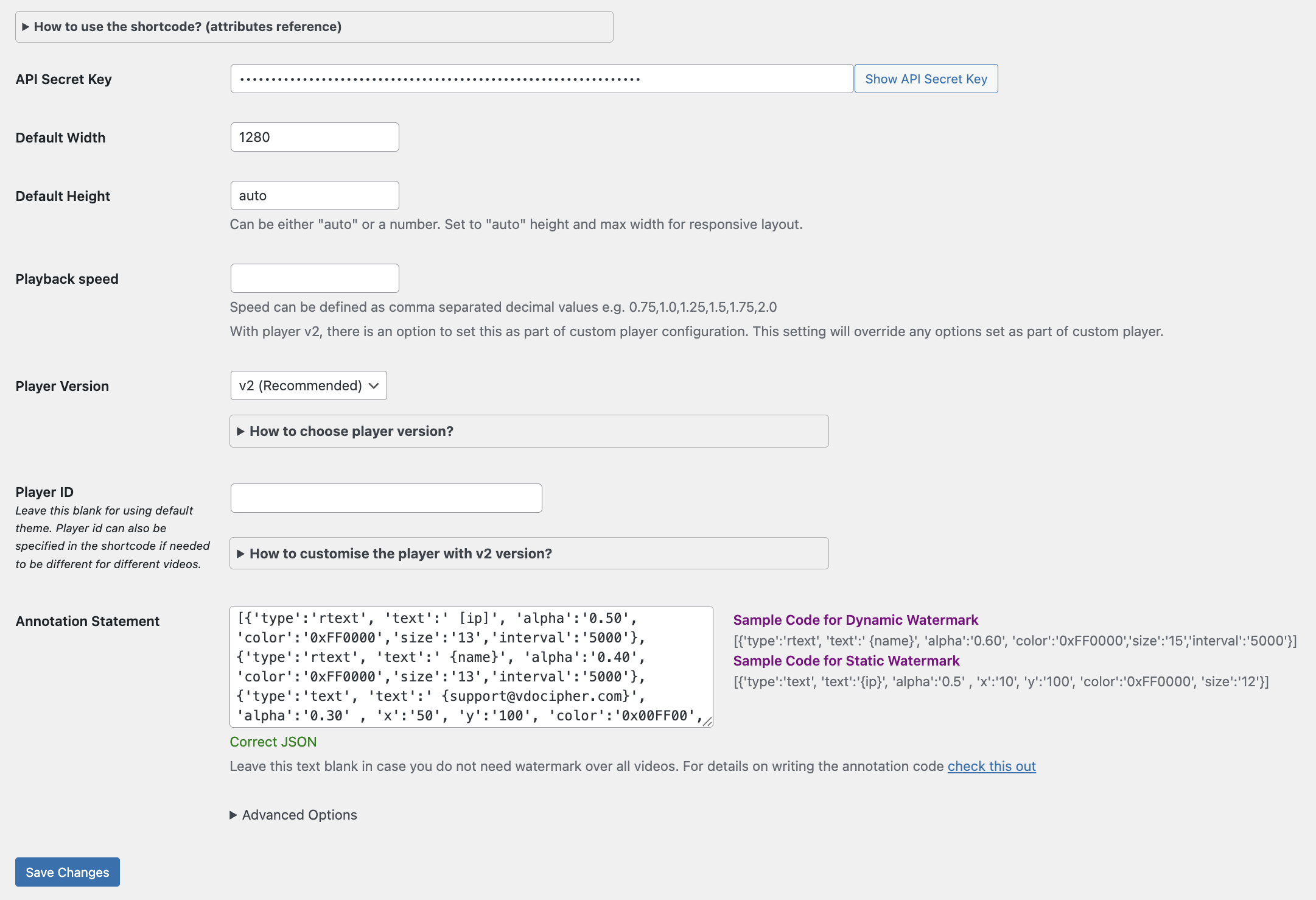
On the plugin settings page, paste your watermark JSON into the Annotation Statement box and save. It then applies to every video you embed with the plugin. Leave the box blank if you don’t want a watermark on all videos, and override it per video in the shortcode when needed.
Like the API, this is a backend integration, so it supports user-specific variables such as {name}, {email}, and {ip}. For more on securing videos in WordPress, see Protect Videos on WordPress.
Method 2: API (Custom Backend)
If you’ve integrated VdoCipher into a custom-built site, pass the watermark JSON as the annotate parameter when you generate the playback authorization (OTP). This backend integration is what lets you show user-specific details like {name} and {email}.
Full details and the exact request format are in the annotation API documentation. A sample OTP request:
curl -X POST \
  https://dev.vdocipher.com/api/videos/1234567890/otp \
  -H 'Accept: application/json' \
  -H 'Authorization: Apisecret a1b2c3d4e5' \
  -H 'Content-Type: application/json' \
  -d '{
    "annotate": "[{\'type\':\'rtext\', \'text\':\'{name}\', \'alpha\':\'0.60\', \'color\':\'0xFF0000\', \'size\':\'15\', \'interval\':\'5000\'}]"
  }'
Here the sample video ID is 1234567890 and the API Secret Key is a1b2c3d4e5. The watermark JSON must be sent as Content-Type: application/json, as the value of the annotate key.
Method 3: VdoCipher Dashboard (Quick Embed)
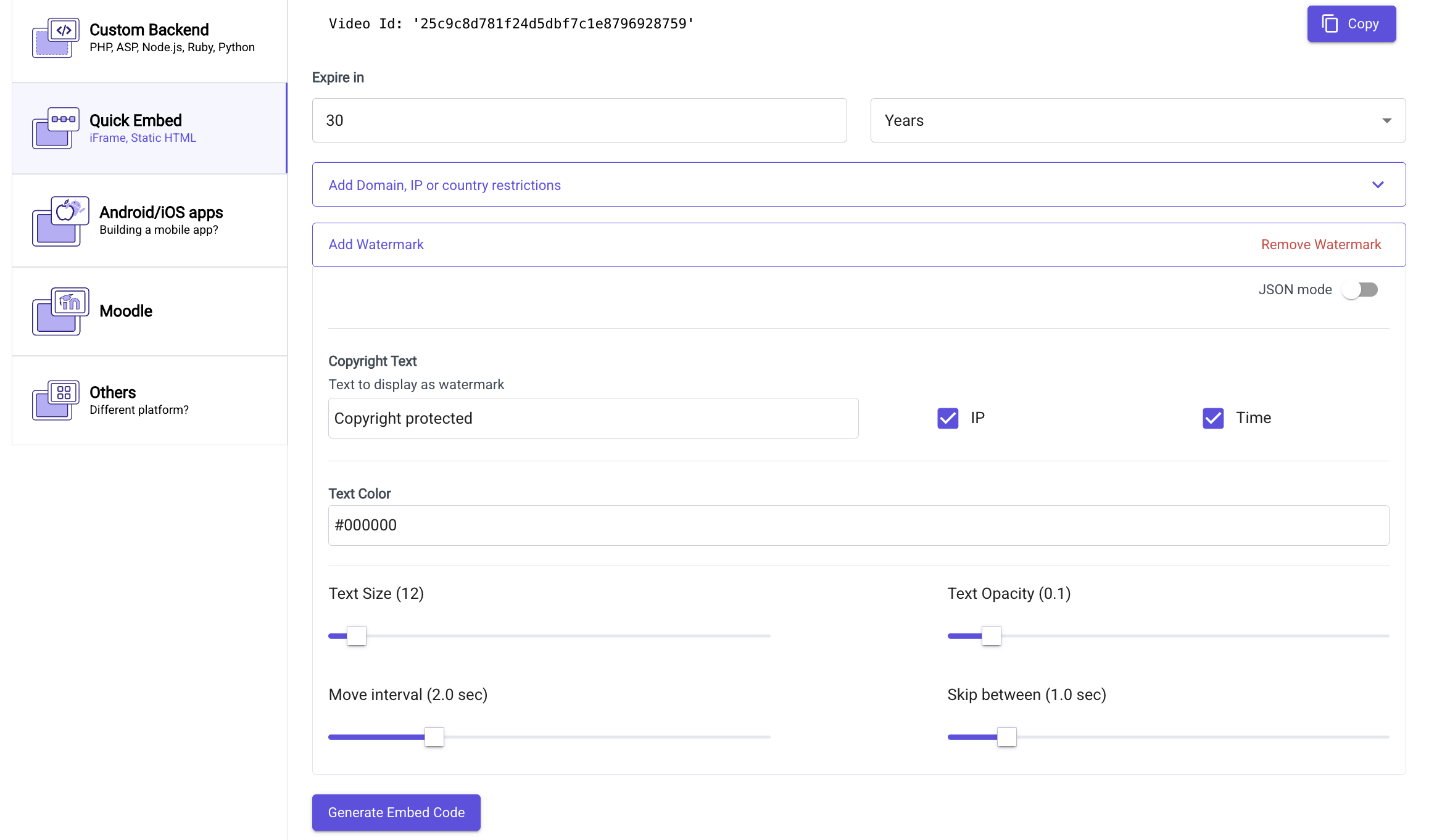
The fastest way, with no coding. In your VdoCipher dashboard, open the video and go to the Embed section, then the Quick Embed tab, and click Add Watermark. Set the copyright text, toggle IP and Time on or off, and adjust the text colour, size, opacity, move interval, and skip using the sliders. Click Generate Embed Code and copy the iframe — it now carries your watermark.
For finer control, switch on JSON mode to edit the raw annotation code directly (see the Watermark Code Reference below).
Watermark Code Reference (JSON)
Methods 2 and 3 — and the Dashboard’s JSON mode — all use the same annotation code: a JSON string describing what to overlay and how.
Technically it’s an array of objects, where each object is a single watermark item. Every item needs a type parameter, which is either a moving text (rtext) or a static text (text). The remaining parameters depend on that type. Here’s a sample that adds both:
[
  {'type':'rtext', 'text':'{name}', 'alpha':'0.8', 'color':'0xFF0000', 'size':'15', 'interval':'5000', 'skip':'20000'},
  {'type':'text', 'text':'static text', 'alpha':'0.5', 'x':'10', 'y':'100', 'color':'0xFF0000', 'size':'15'}
]
Moving (Dynamic) Text
The code below displays a moving watermark showing name, IP, and email on a single line in red (#ff0000), at 0.8 opacity and font size 15. It stays at one position for 5 seconds (5000 ms), then hides for 20 seconds (20000 ms), then reappears at a new position.
[{
  'type':'rtext',
  'text':'{name}, {ip}, {email}',
  'alpha':'0.8',
  'color':'0xFF0000',
  'size':'15',
  'interval':'5000',
  'skip':'20000'
}]
| Parameter | What it does | Example |
|---|---|---|
type |
Watermark type — rtext for moving, text for static. |
'type':'rtext' |
text |
The text to display. Supports the variables {name}, {email}, {ip}, and {date...}. |
'text':'{name}, {ip}' |
alpha |
Opacity, from 0 (invisible) to 1 (fully opaque). | 'alpha':'0.8' |
color |
Text colour as a hex value. Pick a colour and its hex code with the W3Schools converter. | 'color':'0xFF0000' |
size |
Font size in pixels. | 'size':'15' |
interval |
Time in milliseconds the text stays in one position before moving. | 'interval':'5000' |
skip |
Time in milliseconds the watermark stays hidden between appearances. | 'skip':'20000' |
Show user-identifiable information. Use the variables {name}, {email}, and {ip} anywhere in the text — for example:
'text':'Name: {name}, Email: {email}, IP: {ip}'
To display them on separate lines instead of one, create three separate watermark objects:
[
  {'type':'rtext', 'text':'{name}',  'alpha':'0.8', 'color':'0xFF0000', 'size':'15', 'interval':'5000', 'skip':'2000'},
  {'type':'rtext', 'text':'{ip}',    'alpha':'0.8', 'color':'0xFF0000', 'size':'15', 'interval':'5000', 'skip':'2000'},
  {'type':'rtext', 'text':'{email}', 'alpha':'0.8', 'color':'0xFF0000', 'size':'15', 'interval':'5000', 'skip':'2000'}
]
Add a timestamp (WordPress only).
[{'type':'text', 'text':'Time: {date.h:i:s A}', 'alpha':'0.30', 'x':'12', 'y':'130', 'color':'0xFF0000', 'size':'13'}]
Add custom variables. You can also overlay your own custom variables — see Custom Variables as Watermark.
Static Text
A static watermark uses type:'text' and stays in a fixed position, set with x (distance from the left edge) and y (distance from the top edge). Static watermark is not possible for mobile app integration, it only works on web player in browsers.
[{
  'type':'text',   // static watermark
  'text':'the text you like to be displayed',
  'x':'10',        // distance from the left border, in pixels
  'y':'50',        // distance from the top border, in pixels
  'alpha':'0.8',   // opacity: 0 is invisible, 1 is full opaque
  'color':'0xFF0000', // text colour as a hex value
  'size':'15'      // font height, in pixels
}]
Still stuck adding a watermark? Send the code you’re using and the output you want to support@vdocipher.com and we’ll help.
Supercharge Your Business with Videos
At VdoCipher we maintain the strongest content protection for videos. We also deliver the best viewer experience with brand friendly customisations. We'd love to hear from you, and help boost your video streaming business.


(Co-Founder & CTO) Brain behind all VdoCipher innovations, Vibhav eats and sleeps code. A physics and astronomy enthusiast; Vibhav actively works on video delivery technology, security and high volume data transfer using cloud.
 John Crestani says
October 22, 2015 at 8:48 amFor the sample code, where should I put that code on my site, to make it work with the video?
 Vibhav Sinha says
October 22, 2015 at 12:41 pmIn your dashboard, go to vdocipher section under settings menu. You need to place this code in the text box labelled “Annotation Statement”
 Ricardo Miguel says
December 16, 2015 at 12:36 amHi, I have not located this path. Can you help me?
 Vansh says
August 9, 2021 at 10:39 amHello Vaibhav Sir I Have Purchased Plan I Wanted to Know Phone Number Code For Watermark
 Sebastian M Thomas says
July 3, 2025 at 10:09 amthis should be in the payload of the otp request for drm
 Ilan says
January 12, 2016 at 9:27 pmHi! How can I do that with the Joomla plugin ?
 Vibhav Sinha says
January 12, 2016 at 10:50 pmCurrently, this feature is not available within our joomla module. You can use the API directly to enable watermark in your joomla website(using PHP code to make API calls). We have planned this for next version joomla module. Thanks for your suggestion.
 Ilan says
January 12, 2016 at 11:30 pmThanks for your answer. And when do you think to publish your next release of the Joomla plugin? This feature is really important for me. Thanks!
 bailarina says
January 28, 2016 at 10:36 amCould it display the name of the person who is watching if they are logged in? Thanks!
 Vibhav Sinha says
February 1, 2016 at 7:07 amHi Bailarina, yes if you can put any variables that you can obtain as watermark. If you are using the wordpress plugin, there is a very easy way to do that as described here https://www.vdocipher.com/blog/2014/08/variables-on-wordpress-videos/
 Peter says
August 9, 2016 at 9:02 amHow to prevent the copying of video link to use by other users?
 siddhant says
August 9, 2016 at 9:08 amHello Peter, VdoCipher does not use normal public embed codes. Through our plugins & APIs, we provide a custom embed code, which generates a new url with OTP (One time password) at backend. Thus once a video url is generated for streaming, it will not play for second time.
 Weraan says
July 18, 2022 at 8:37 am$apikey = “$key”;
$vidID = $CourseYoutubeLink;
$curl = curl_init();
curl_setopt_array($curl, array(
CURLOPT_URL => “https://dev.vdocipher.com/api/videos/$vidID/otp”,
CURLOPT_RETURNTRANSFER => true,
CURLOPT_ENCODING => “”,
CURLOPT_MAXREDIRS => 10,
CURLOPT_TIMEOUT => 30,
CURLOPT_HTTP_VERSION => CURL_HTTP_VERSION_1_1,
CURLOPT_CUSTOMREQUEST => “POST”,
CURLOPT_POSTFIELDS => json_encode([
“ttl” => 300,
]),
CURLOPT_HTTPHEADER => array(
“Accept: application/json”,
“Authorization: Apisecret $apikey”,
“Content-Type: application/json”
),
));
$response = curl_exec($curl);
$err = curl_error($curl);
$obj = json_decode($response);
curl_close($curl);
if ($err) {
echo “cURL Error #:” . $err;
} else {
$otp = $obj->otp;
$playback = $obj->playbackInfo;
This is my current code can you place add watermark to this ?
 Rahul Rana says
September 13, 2022 at 11:27 amKindly share this query in detail at support@vdocipher.com
 Shine says
February 3, 2026 at 2:38 amWhen the video is paused the watermark doesn’t show. Is there any way to solve this problem?
 Rahul Rana says
February 3, 2026 at 10:02 amCurrently, a watermark in the pause state is not possible. If we allow a watermark on pause video, then it becomes easier for a hacker to check the network and remove our watermark, to prevent easy removal of the watermark, we only show it while the video is playing. Thus, we cannot show a watermark in the pause state.