
If you’ve ever tried to live stream a church service, you already know the challenge isn’t faith or effort, it’s equipment, budget, and people. Most churches don’t have a dedicated production team, expensive cameras, or the time to experiment every week. Yet every Sunday, the expectation remains the same: clear audio, watchable video, and a stream that doesn’t fail mid-sermon. This guide is written for churches exactly in that position, looking for a simple, reliable church live streaming setup that works within real-world constraints. We talk about what equipment is needed to live stream a church service.
“A simple, repeatable setup matters more than cinematic gear.”
Table of Contents:
- Start With the Goal: What Kind of Church Stream Is This?
- Core Church Live Streaming Equipments
- Cameras for Church Live Streaming (With Angles & Placement)
- Lighting Setup for Churches
- Audio Equipments
- Video Switcher & Encoder (Professional Setup)
- Internet & Network Requirements
- How VdoCipher Supports Church Live Streaming
- Common Church Live Streaming Mistakes
- FAQs
Start With the Goal: What Kind of Church Stream Is This?
Before purchasing cameras, microphones, or lighting, it’s important to clarify what your church is trying to achieve with live streaming. Not all church streams serve the same purpose, and the right equipment depends more on the use case than on budget alone.
For some churches, live streaming is about reaching elderly or homebound members. For others, it’s about extending worship beyond physical walls, streaming special services, or building a sermon library for later viewing. A weekday prayer meeting requires a very different setup than a Sunday service with worship music, scripture slides, and a full congregation.
Answering a few simple questions upfront can prevent unnecessary spending and technical complexity later.
Key Questions to Define Your Church’s Live Streaming Goal
1. Who is the primary audience?
- Homebound members and seniors
- Remote families and parishioners
- Public viewers discovering your church online
2. Is the stream live-only or also meant for replay?
- Live worship only
- Live + recorded sermons for later viewing
- Long-term sermon archives on your website
3. What needs to be captured on camera?
- Sermon only
- Sermon + worship music
- Sermon + scripture slides or lyrics
- Full service including congregation moments
4. How complex should the setup be?
- One-button operation for volunteers
- Multi-camera switching with presets
- Integration with slides and lyrics
5. How often will you stream?
- Weekly services
- Special occasions and festivals
- Daily or mid-week prayer sessions
Once the goal of your church live stream is clear, selecting the right equipment and placing it correctly becomes far easier and more cost-effective.
Core Church Live Streaming Equipments
| Component | Purpose | Minimum Recommendation | Ideal for Churches |
| Camera | Capture sermon & worship | 1080p, clean HDMI/USB output |
PTZ camera for preset shots
|
| Microphone | Capture pastor’s voice | Wireless lavalier mic |
FOH mixer + dedicated stream mix
|
| Lighting | Illuminate subject for camera | Front LED panels |
Front + back + accent lighting
|
| Video Switcher | Switch camera & slides | 2 HDMI inputs |
Hardware switcher (future-ready)
|
| Encoder | Compress & send stream online | Software encoder |
Hardware encoder for stability
|
| Internet | Upload live stream | 6–8 Mbps upload |
Wired Ethernet with backup
|
Cameras for Church Live Streaming (With Angles & Placement)
Choosing the right camera for church live streaming is less about buying the most expensive gear and more about matching the camera to your church size, service style, and volunteer capacity. A small chapel streaming occasionally has very different needs than a mid-sized church running weekly services with limited technical help.
VdoCipher supports churches in sharing services online with care, reliability, and respect for the congregation’s time.
Camera Types
Smartphone Cameras (Starter / Temporary Setup)
When to Use
- Very small churches or chapels
- Short-term or emergency live streaming
- First-time testing before investing in equipment
Recommended Specs
- Rear camera (not selfie)
- Minimum 1080p @ 30fps
- Optical image stabilization preferred
- External microphone support (mandatory)
Budget Range
₹0 – ₹5,000 ($0 – $60)
(assuming phone already exists; cost mainly for tripod & mic)
Ideal Camera Placement
- Center aisle, 10-15 feet from altar
- Mounted on a stable tripod at eye level
- Must be well-lit from the front
- Works only if lighting is good. Phones struggle badly in dim churches.
Smartphone cameras are not designed for continuous weekly services or large sanctuaries due to limited zoom and low-light performance.
Camcorders (Simple & Reliable)
When to Use
- Small to mid-sized churches
- Sermon-focused services
- Minimal technical volunteers
Recommended Specs
- Optical zoom: 10x-20x
- Clean HDMI output
- Continuous power support
- 1080p recording (4K optional, not required)
Budget Range
- ₹30,000 – ₹70,000 ($350 – $800)
Ideal Camera Placement
- Rear center aisle
- Fixed position facing the pulpit
- Slight elevation to avoid heads in the frame
Strengths
- Designed for long recording sessions
- Stable, predictable performance
- Simple controls
Limitations
- No remote pan/tilt
- Single fixed angle
- Requires physical repositioning
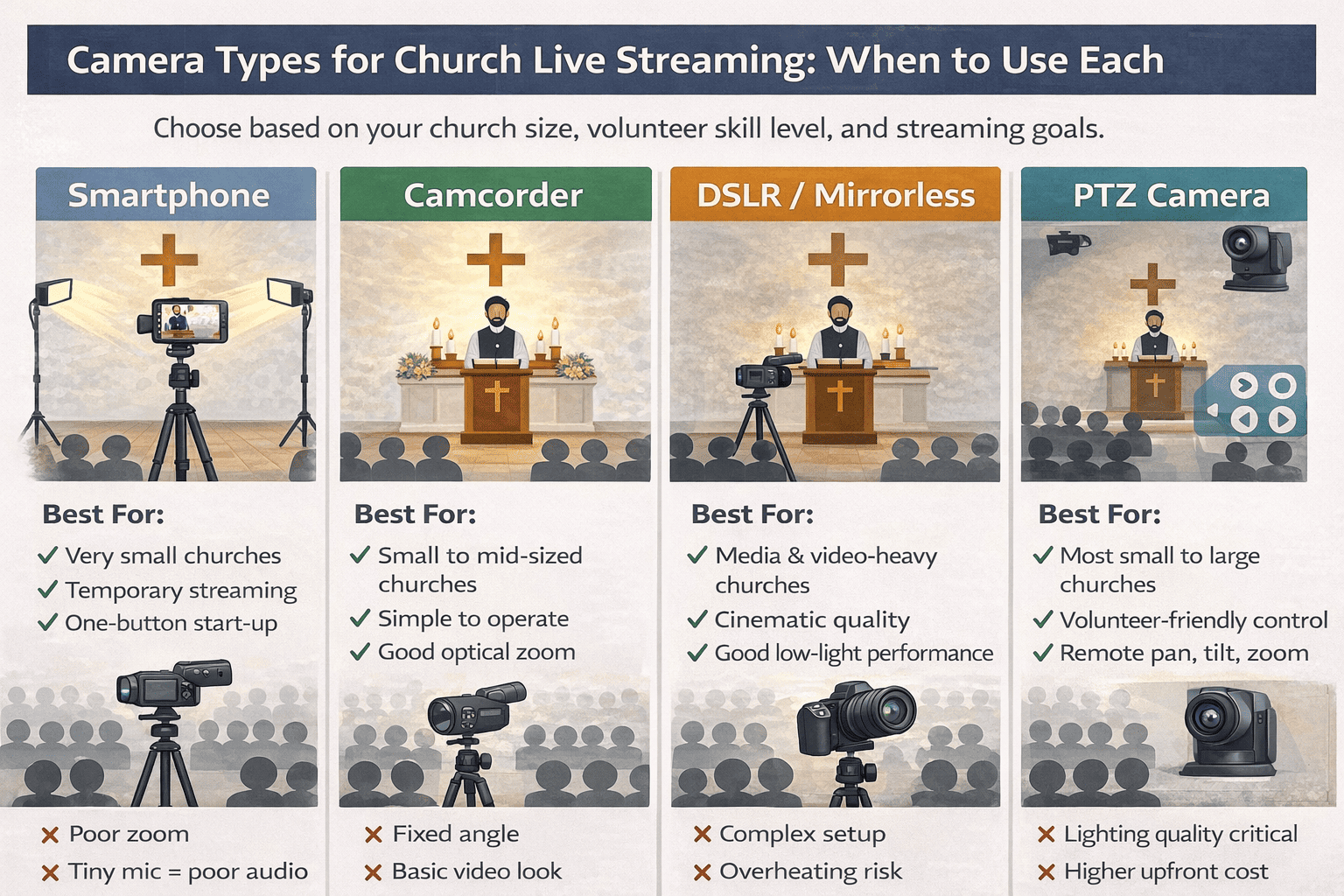
DSLR / Mirrorless
When to Use
- Churches prioritizing visual quality
- Sermon recordings + edited content
- Dedicated technical volunteers available
Recommended Specs
- Clean HDMI output
- Large sensor (APS-C or Full Frame)
- Manual exposure control
- Dummy battery / continuous power
- External capture card support
Budget Range
₹60,000 – ₹1,50,000+ ($700 – $2,000+)
Ideal Camera Placement
- Side aisle at 30-45° angle
- Medium distance for natural depth
- Avoid placing too close to altar
Strengths
- Excellent low-light performance
- Cinematic look
- Great for recordings and highlights
Critical Warnings
- Can overheat during long services
- Requires constant monitoring
- Not beginner-friendly
DSLR cameras are best when image quality is a priority and technical expertise is available.
PTZ Camera (Best Overall Choice for Churches)
When to Use
- Most small to large churches
- Limited volunteers
- Weekly or frequent live streaming
Recommended Specs
- 1080p @ 30fps (4K optional)
- Optical zoom: 12x-20x
- Preset support (minimum 5-10 presets)
- HDMI / USB / IP output
- Remote or software control
Budget Range
₹80,000 – ₹2,00,000 ($1,000 – $2,500)
Ideal Camera Placement
- Rear center aisle (primary sermon camera)
- Optional side placement for secondary PTZ
- Mounted discreetly to avoid obstructing worship
Why PTZ Works Best for Churches
- Pan / Tilt / Zoom covers multiple shots with one operator
- Works well when only 1 person is running the stream
- Control options: app/software/remote presets (wide shot, tight shot)
For most churches, a PTZ camera offers the best balance of quality, control, and simplicity.
| Camera Type | Popular Global Brands | Budget ($) | Best Placement |
| Smartphone | Apple, Google, Samsung | 0-100 | Center aisle |
| Camcorder | Sony, Canon, Panasonic | 400-900 | Rear center |
| DSLR/Mirrorless | Sony, Canon, Nikon | 700-2,000+ | Side aisle |
| PTZ Camera | PTZOptics, AVer, Sony | 900-3,000+ | Rear / side |
Camera Placement & Angles
Typical church live streams use a few key camera angles to create a clear and engaging viewing experience.
The main sermon camera is placed in the center aisle, directly facing the altar or pulpit, and serves as the primary view for sermons and readings. A side camera at a 45° angle adds depth and a natural perspective during emphasis moments. A wide camera at the back captures the congregation and prayer atmosphere, helping online viewers feel included.
Some churches also add a static entrance or gate camera to cover processions, festivals, and weddings, along with a dedicated choir or music camera to highlight worship moments, especially during special services. Churches can start with just the main camera and gradually add more angles as needs and resources grow.
| Angle | Primary Goal | Recommended Camera |
| Center Aisle | Sermon clarity | PTZ / Camcorder |
| Side (45°) | Depth & emphasis | PTZ / Mirrorless |
| Rear Wide | Community view | PTZ / Camcorder |
| Entrance | Processions | PTZ (preset) |
| Choir | Worship focus | PTZ / Mirrorless |
Lighting Setup for Churches
Lighting is one of the most overlooked parts of church live streaming. One of the biggest reasons streams look dull, noisy, or unprofessional. Most churches rely on lighting designed for people in the room, not for cameras. Unfortunately, what looks fine in person often looks dark, flat, or harsh on screen.
The good news is that you don’t need stage-level lighting to fix this. Small, intentional adjustments can make a dramatic difference.
Why Church Lighting Fails on Camera
- Room lights are usually overhead, creating shadows on faces
- Bright backgrounds cause faces to look underexposed
- Cameras struggle in low light, adding grain and noise
- White robes or reflective surfaces confuse auto-exposure
Cameras need directional, front-facing light to clearly capture faces.
The Minimum Lighting Churches Should Aim For
Front Lighting
Front light ensures the priest or pastor’s face is clearly visible.
Best placement
- Two lights placed at 45° angles from the front
- Slightly above eye level, angled down
- Even illumination across the face
Recommended specs
- LED panel or softbox
- Color temperature: 5600K (daylight)
- Adjustable brightness (dimmable)
- CRI 90+ for natural skin tones
Back / Accent Lighting (Optional but Powerful)
Back lighting separates the speaker from the background and adds depth.
Best placement
- Behind or slightly above the altar
- Aimed at the background, not the face
Use cases
- Sermons with dark backdrops
- Festive services and special occasions
If the camera exposure can stay stable without constantly adjusting brightness, your lighting is doing its job.
What to Avoid
- Relying only on ceiling lights
- Pointing lights straight down
- Mixing warm and cool lights randomly
- Using colored lights on faces
- Letting windows backlight the speaker
| Church Size / Setup | Budget (₹ / $) | Lighting Configuration | Placement & Setup | Result |
| Starter Lighting(Very Small Churches) | ₹3,000-₹6,000 ($40-$80) | 1 soft LED panel or ring light | Slightly off-centerAt eye level. Fixed brightness |
Better than ceiling lights alone. Limited depth, but usable
|
| Standard Church Setup(Most Churches) | ₹8,000-₹15,000 ($100-$180) | 2 LED panels or softboxes | 45-degree front lighting from both sides. Even face illumination |
Clear faces. Stable exposure. Best value for impact
|
| Enhanced / Festive Setup(Growing Churches) | ₹18,000-₹30,000 ($220-$360) | 2 front lights 1-2 accent lights |
Soft front lighting. Background or wall lighting for depth |
Ideal for Christmas, Easter, weddings. Makes even basic cameras look premium
|
Audio Equipments
In church live streaming, clear audio is more important than sharp video. Viewers may accept an average camera angle, but muffled speech, echo, or inconsistent volume will quickly cause them to leave the stream. A good audio setup ensures that sermons, prayers, and worship are clear, balanced, and comfortable to listen to.
Microphones: Capturing Clear Sound at the Source
A church live stream usually needs multiple microphone types, each serving a specific purpose.
Lapel (Lavalier) Microphone – Primary Mic
- Worn by the priest or pastor
- Delivers consistent, close-range speech
- Ideal for sermons and readings
- Minimizes room echo and ambient noise
Recommended specs
- Wireless (UHF or 2.4 GHz)
- Omnidirectional capsule
- Battery life: 6-8 hours
- Line-level or mic-level output compatible with mixers
This should be the main microphone for most sermons.
Podium / Lectern Microphone – Backup & Readings
- Mounted on the pulpit or lectern
- Useful for scripture readings or guest speakers
- Acts as a backup if the lapel mic fails
Recommended specs
- Gooseneck or cardioid pattern
- Shock-mounted base
- Balanced XLR output
Choir Microphone – Worship & Music
- Used to capture singers or group vocals
- Typically placed in front of or above the choir
- Adds clarity and fullness to worship segments
Recommended mic types
- Condenser microphones (for clarity and detail)
- Shotgun microphones (for directional pickup in larger spaces)
Recommended specs
- Cardioid or super-cardioid pattern
- High sensitivity
- Low self-noise
- Phantom power support (48V)
Avoid Using Camera Microphones because built-in camera microphones, pick up room echo and congregation noise, Sound distant and hollow and aren’t not suitable for sermons or worship
Camera microphones should be used only as emergency backup, never as the primary audio source.
Audio Mixer: Bringing Everything Together
An audio mixer is the heart of the church’s audio system. It combines all microphones and instruments into a single, controlled audio feed for the live stream.
What an Audio Mixer Does
- Combines sermon mic, podium mic, and choir audio
- Balances speech and music levels
- Prevents clipping and distortion
- Allows volume control for different service segments
Why a Mixer Prevents Echo
By taking audio directly from microphones, rather than from room speakers, the mixer:
- Reduces reverb and hall echo
- Keeps speech clean and intelligible
- Avoids feedback loops
Recommended Audio Mixer Specs for Churches
- Minimum 4-8 input channels
- Balanced XLR inputs for microphones
- Auxiliary (AUX) output for live streaming
- USB audio output (preferred)
- Individual gain and level controls
- Phantom power support for condenser mics
If your church already has a soundboard, you usually don’t need a new one, just a clean output for the live stream.
Best Practice: Create a Dedicated “Stream Mix”
Audio that sounds good inside the church doesn’t always sound good online. A separate stream mix allows you to:
- Prioritize speech clarity
- Reduce loud room ambience
- Control music levels independently
This can be done using an AUX output on the mixer, or a secondary mix specifically for the live stream.
| If your church is.. | Start with.. |
| Very small | Single camera + lav mic |
| Medium-sized |
PTZ camera + lighting + switching
|
| Large or growing |
Multi-camera + lighting + dedicated stream mix
|
| Event-focused | Wide coverage + recording |
Video Switcher & Encoder (Professional Setup)
Once cameras and audio are in place, the next step is bringing everything together into a single, reliable live stream. This is handled by two closely related components: the video switcher and the encoder. Together, they form the backbone of a professional church live streaming setup.
What a Video Switcher Does
A video switcher allows you to manage multiple video sources during a service and decide what viewers see at any given moment. It acts as a central hub where all visual inputs are combined.
In a church setup, a video switcher typically connects to:
- One or more cameras (sermon, side angle, wide shot)
- A presentation laptop (scripture, lyrics, sermon slides)
- Audio feed from the church mixer
Key benefits of using a video switcher:
- Seamlessly switch between sermon, slides, and wide shots
- Create a more engaging and intentional viewing experience
- Reduce the workload on the streaming computer
- Make the setup easier for volunteers to operate
Even if your church starts with a single camera, a switcher makes it easier to add more cameras or slides later without redesigning the setup.
What an Encoder Does
The encoder is responsible for preparing the live video for the internet. It takes the final output from the video switcher, compresses it, and sends it to the live streaming destination.
An encoder handles:
- Video compression (resolution, bitrate, frame rate)
- Audio synchronization
- Stream stability over the internet
- Delivery to platforms or websites
Encoders can be software-based (running on a computer) or hardware-based (built into some video switchers)
In many modern church setups, the video switcher and encoder are combined into a single device, simplifying installation and reducing failure points.
Recommended Specs for Churches
Video Switcher (Minimum)
- 2-4 HDMI inputs
- Audio input support
- Program (final output) feed
- Physical buttons or simple control software
Encoder (Minimum)
- Supports 1080p at 30fps
- Adjustable bitrate (4-8 Mbps for HD)
- RTMP or similar streaming protocol support
- Stable wired internet connection
How Churches Typically Use Switchers & Encoders
- During sermons: switch between the main sermon camera and side angle
- During scripture or teaching: switch to slides or picture-in-picture
- During worship: show choir or wide congregation shots
- For volunteers: use presets and simple controls to avoid mistakes
Internet & Network Requirements
To keep church live streams reliable, the network setup should be simple and intentional. A wired Ethernet connection is always preferable to Wi-Fi, as it provides consistent upload speeds and reduces the risk of dropouts during the service.
Using a stable, business-grade or reliable consumer router helps prevent sudden disconnections, especially during peak usage times. Churches should also avoid sharing the streaming network with public or guest Wi-Fi, as other users can quickly consume upload bandwidth.
For added safety, having a backup option, such as a mobile hotspot or secondary internet connection can prevent complete stream failure during important services. Finally, running a speed test 30-60 minutes before going live allows teams to catch issues early and make adjustments before the congregation joins online.
| Church Setup | Recommended Upload Speed | Network Type | Key Requirements | What This Ensures |
| Starter Setup(Single camera, basic stream) | 5-8 Mbps | Wired broadband preferred | Stable connection. No heavy network usage during service |
Smooth 720p–1080p stream without buffering
|
| Standard Church Setup(Multiple cameras or slides) | 10-15 Mbps | Dedicated wired connection | Router close to streaming system. Minimal Wi-Fi dependency |
Reliable 1080p streaming with stable audio
|
| Professional Setup(PTZ cameras, frequent services) | 20+ Mbps | Dedicated wired line | Separate network for streaming. Ethernet to encoder/switcher |
High-quality stream with minimal drop risk
|
| Large / Event-Based Streaming(Festivals, Christmas, Easter) | 30+ Mbps | Dedicated or backup ISP | Secondary internet backup. Failover ready |
Maximum reliability during peak viewership
|
How VdoCipher Supports Church Live Streaming
Once your church has cameras, audio, lighting, switching, and a stable internet connection in place, the final step is choosing how your service is delivered and experienced online. This is where a dedicated video platform like VdoCipher fits into the church live streaming workflow.
While many churches begin with social platforms for convenience, growing ministries often look for more control, consistency, and a distraction-free viewing experience, especially when streaming directly on their own website.
Reliable live streaming delivery
VdoCipher is designed to handle long-form live streams like church services, ensuring smooth playback across devices and varying internet conditions. Congregants can join services from phones, tablets, or desktops without frequent buffering or playback issues.
Seamless transition from live service to recorded sermon
After a service ends, the live stream can be made available as a recorded sermon, allowing members to watch later, catch up on missed services, or revisit teachings during the week, all from the same platform.
Website-first streaming experience
Instead of redirecting viewers to external platforms, churches can embed live and recorded services directly on their own website. This helps maintain focus on worship, reduces distractions, and keeps congregants within the church’s digital space.
Consistent viewing experience across services
VdoCipher’s player provides a clean, consistent interface for both live services and recorded sermons, helping churches present worship content in a way that feels intentional and respectful.
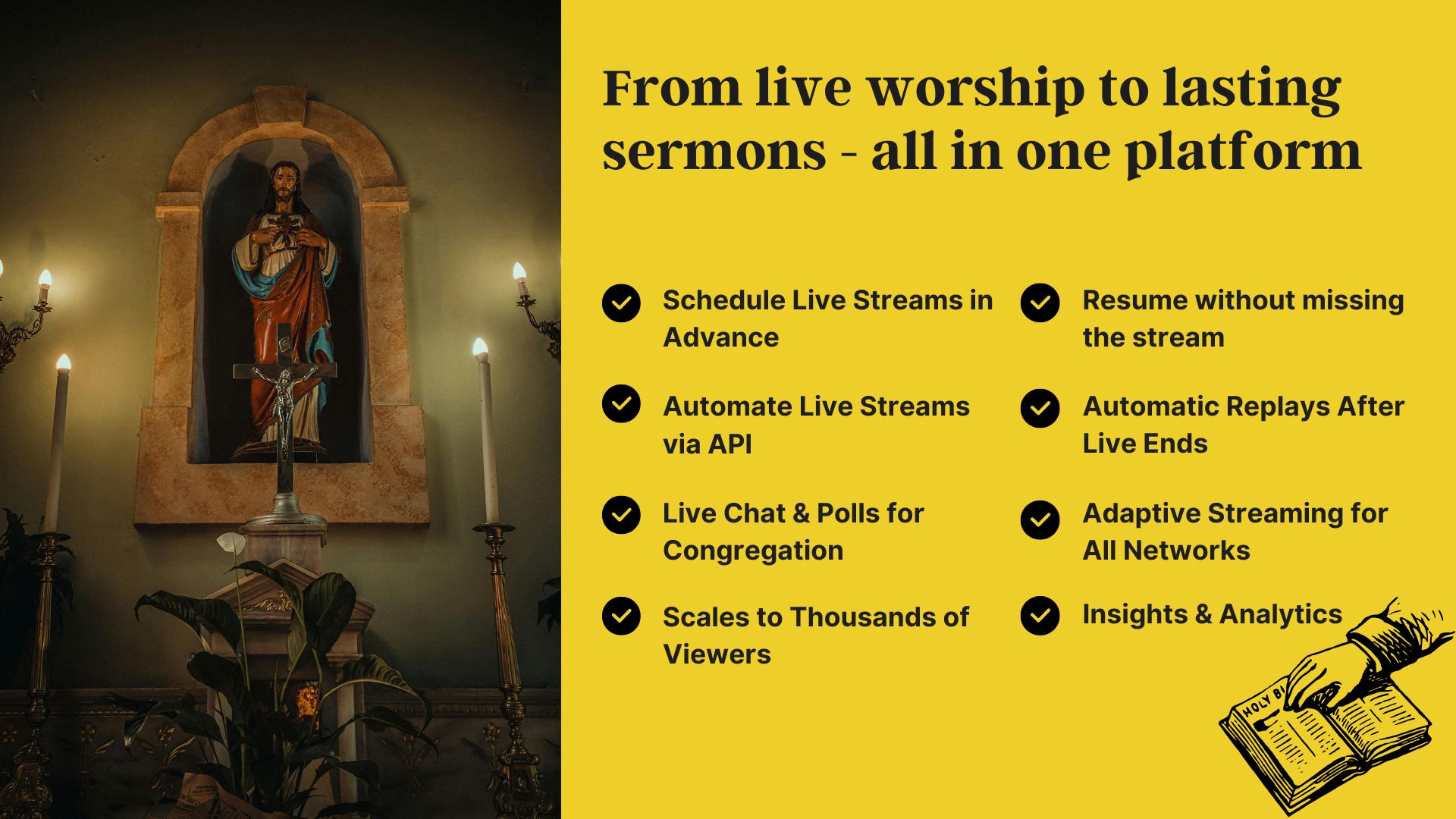
How VdoCipher Fits Into Your Church Setup
By the time your church reaches this stage, the technical flow typically looks like this:
- Volunteers manage production locally
- The encoder sends the live feed to VdoCipher
- Congregants watch live or access recordings later
- Churches manage everything from a single video platform
This setup keeps production, delivery, and playback clearly separated, making the system easier to maintain week after week.
When Churches Commonly Choose a Platform Like VdoCipher
Churches often move to a dedicated platform when they want to:
- Stream services on their own website
- Offer live and recorded services in one place
- Reduce reliance on social media platforms
- Maintain a focused, worship-first viewing environment
- Build a long-term sermon library
Common Church Live Streaming Mistakes
If you’ve faced one or more of these, you’re not alone. Most churches do.
Live Stream Readiness Checklist
- Prioritizing camera upgrades but ignoring audio clarity
- Relying on a single, static camera angle for long sermons
- Using room lights instead of proper front lighting for the stage
- Depending on the camera’s built-in microphone
- Running very long HDMI cables without signal boosters
- Streaming directly from a laptop with no switcher or encoder
- No test run before Sunday service
- No backup plan for audio or internet issues
If you checked more than two boxes, your setup likely needs small structural improvements, not a complete overhaul.
The good news is that nearly all of these problems can be fixed with better placement, clearer signal flow, and purpose-built tools, rather than expensive upgrades. Adding a dedicated audio mix, improving front lighting, or introducing a simple video switcher often delivers more impact than buying a new camera.
Churches that approach streaming as a repeatable system, rather than a weekly workaround, end up with calmer volunteers, fewer last-minute issues, and a more respectful experience for online worshippers.
FAQs
Should churches record live streams for later viewing?
Absolutely. Recorded sermons allow members who missed the service to watch later and help extend the church’s reach. Most modern platforms automatically convert live streams into replay-ready videos within minutes after the service ends.
How can churches improve engagement during live streams?
Features like live chat, polls, and real-time interaction help online viewers feel connected. Encouraging participation during prayers, sermons, or announcements increases engagement and strengthens the sense of community.
Is church live streaming only for large congregations?
No. Live streaming benefits churches of all sizes. Small churches can start simple and affordable, while larger congregations can scale up for festivals, weddings, and special events without changing the core setup.
What are the most common mistakes churches make when live streaming?
Common mistakes include poor lighting, relying on camera microphones, unstable internet connections, last-minute setup, and lack of rehearsal. Most issues can be avoided with simple planning and testing before the service.
Can we live stream a church service using just a smartphone?
Yes, smartphones can be used for very small churches, temporary setups, or testing purposes. However, they require good front lighting, a stable tripod, and an external microphone. Smartphones are not ideal for long-term or weekly services due to limited zoom, low-light performance, and reliability issues.
Supercharge Your Business with Videos
At VdoCipher we maintain the strongest content protection for videos. We also deliver the best viewer experience with brand friendly customisations. We'd love to hear from you, and help boost your video streaming business.

Jyoti began her career as a software engineer in HCL with UNHCR as a client. She started evolving her technical and marketing skills to become a full-time Content Marketer at VdoCipher.
Leave a Reply