

This article is more about DRM encryption specifically and not around the whole DRM system and its working. We will be looking mainly at the layers where encryption and decryption is happening.
Most DRM content stops at, “media is encrypted with AES”, and almost nobody maps the distinct cryptographic layers (content encryption, CDM to license-server session crypto, and key-wrapping and delivery). Let us dig into the specs so the article holds up technically.
What is DRM Encryption?
DRM encryption is not a single encryption performed on a media file where you will get an encryption key and content identifiers. It is not as simple as that.
A DRM-protected streaming pipeline is not even just AES-128. It is a stack of at least four cryptographic layers:
- Symmetric content encryption at packaging time (AES-128 in CTR or CBC mode via ISO/IEC 23001-7 Common Encryption).
- An asymmetric license-request handshake built on each CDM’s factory-provisioned device key (RSA-2048 for Widevine, ECC P-256 for PlayReady, an Apple-issued RSA app certificate plus derived AES keys for FairPlay).
- Server-side key wrapping, where the content key is re-encrypted uniquely for the requesting device.
- On-device key-ladder decryption inside a TEE or Secure Enclave, plus HDCP link encryption on the output.
A simple way to picture it: the video file is a locked shipping container. The container lock is the same for everyone and it is a fast, cheap lock, because it has to be opened millions of times per second while video plays. The interesting security is not the container lock at all. It is that the key is never shipped with the container, that a device must prove its factory identity before receiving the key, that the key is then placed in a second box only that one device can open, that the key is kept inside a sealed part of the chip the operating system cannot read, and that the decoded video gets re-encrypted one more time on the cable to your screen.
Now further on we will discuss these 4 layers.
Layer 1: Content Encryption at Packaging Time
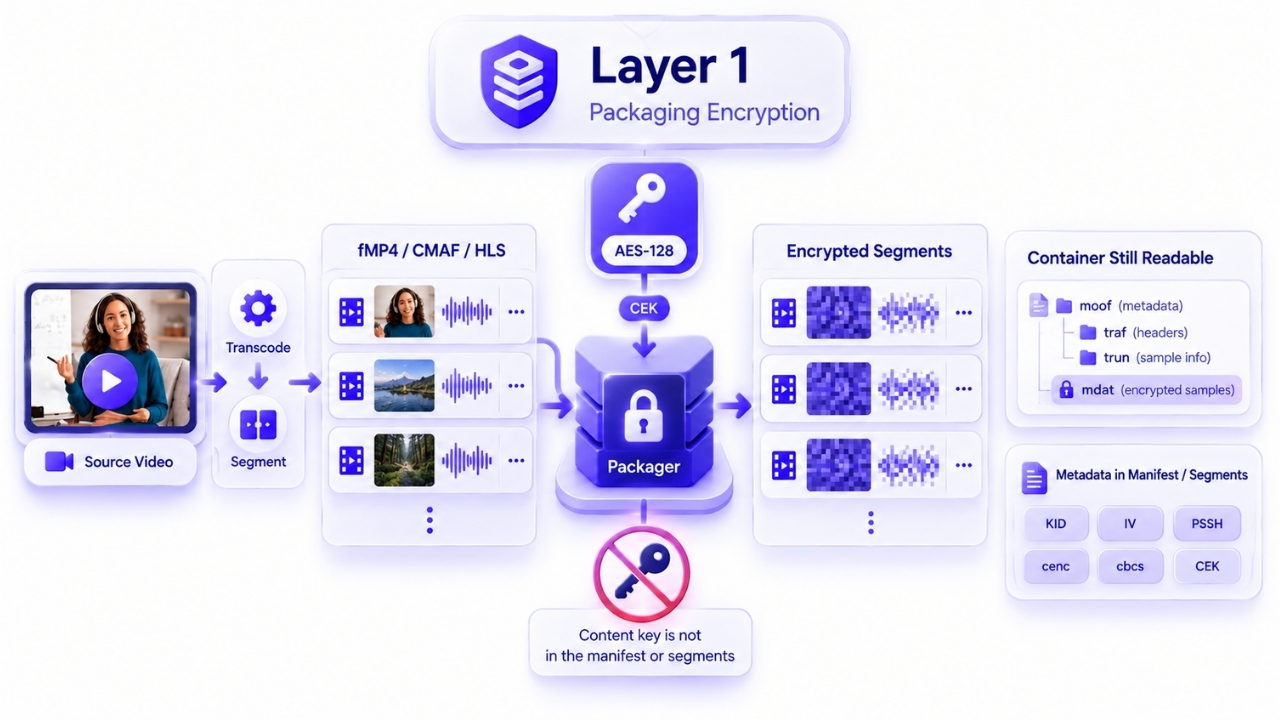
After transcoding and segmentation into fMP4 or CMAF (or MPEG-TS for legacy HLS), the packager encrypts the media samples, not the container boxes, with a symmetric content key (CEK), a 16-byte AES key. CENC is deliberately not a key-management or license protocol. It standardizes only the encryption format and metadata so any compliant DRM can locate the right key.
That distinction matters more than it sounds. The container structure stays readable, so a player can parse timing, codec configuration and segment boundaries without any key at all. Only the picture and sound data is scrambled. This is why a DRM-protected stream still seeks, still adapts bitrate and still reports duration correctly before a license is ever fetched.
Two schemes matter in production, both AES-128: cenc, which is AES-128-CTR over the full protected range, and cbcs, which is AES-128-CBC with pattern encryption. The manifest and the segments end up carrying the key ID, the IVs, the scheme and the per-DRM PSSH boxes. They never carry the content key itself.
Layer 2: Client-Side CDM Cryptography
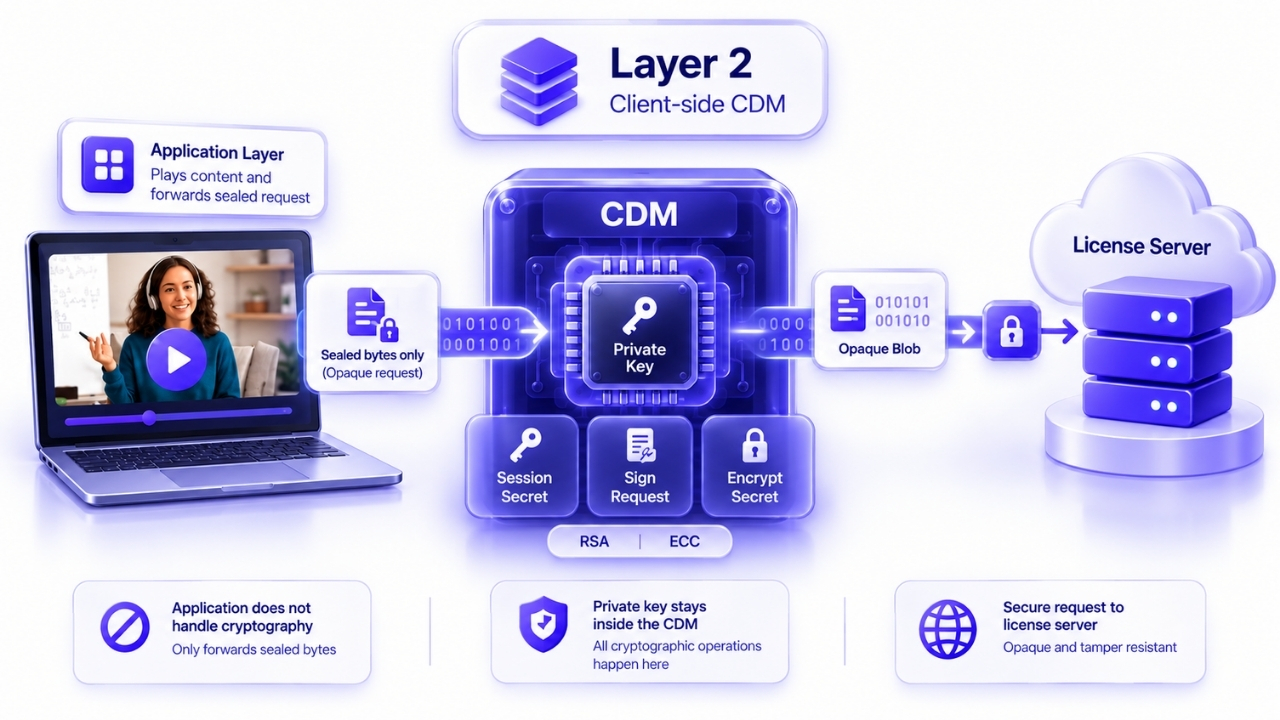
Layer 1 protected the content. Layer 2 is about the device proving who it is, in a way that cannot be forged or replayed, before anyone hands it a key.
The Content Decryption Module holds a private key provisioned at manufacture, generates the license request, signs it with that key, and encrypts a fresh per-session secret into it. Widevine does this with RSA-2048, PlayReady with ECC P-256, FairPlay with an Apple-issued RSA application certificate plus an AES key derived from a shared application secret.
The output of this layer is a single opaque binary blob: a Widevine license request, a FairPlay SPC, or a PlayReady license challenge. Your application code never generates it, never signs anything, and never inspects it. It only forwards bytes.
Layer 3: License Server and KSM Cryptography
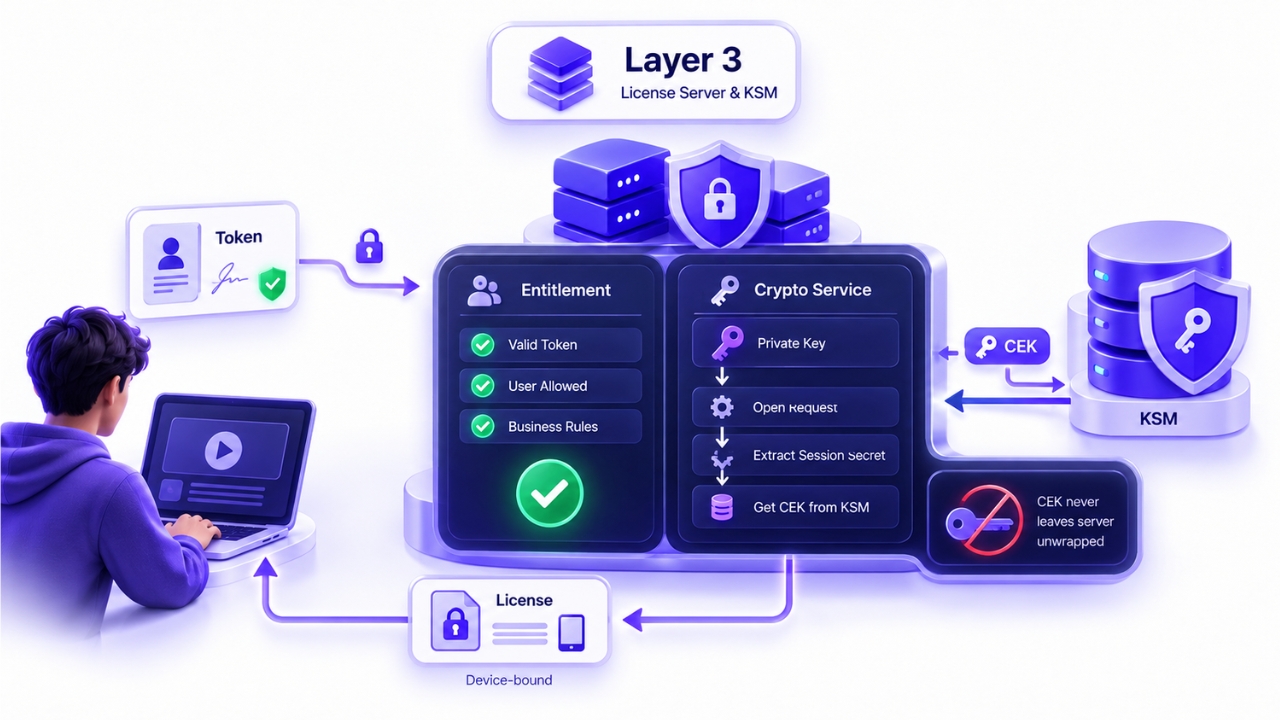
The server does two logically separate jobs, and keeping them separate makes the whole architecture easier to reason about.
The first is entitlement: is this user, on this session, allowed to watch this content right now? That is business logic, normally answered by validating a signed token, and it involves no content keys at all.
The second is the crypto step: open the request the client sent using a server-held private key, extract the client’s session secret, fetch the content key from the key management system, and re-encrypt that content key so that only the one device that made the request can open it. The result is a Widevine license, a FairPlay CKC, or a PlayReady XMR license. The content key never leaves the server unwrapped.
Layer 4: Device Decryption and Output Protection
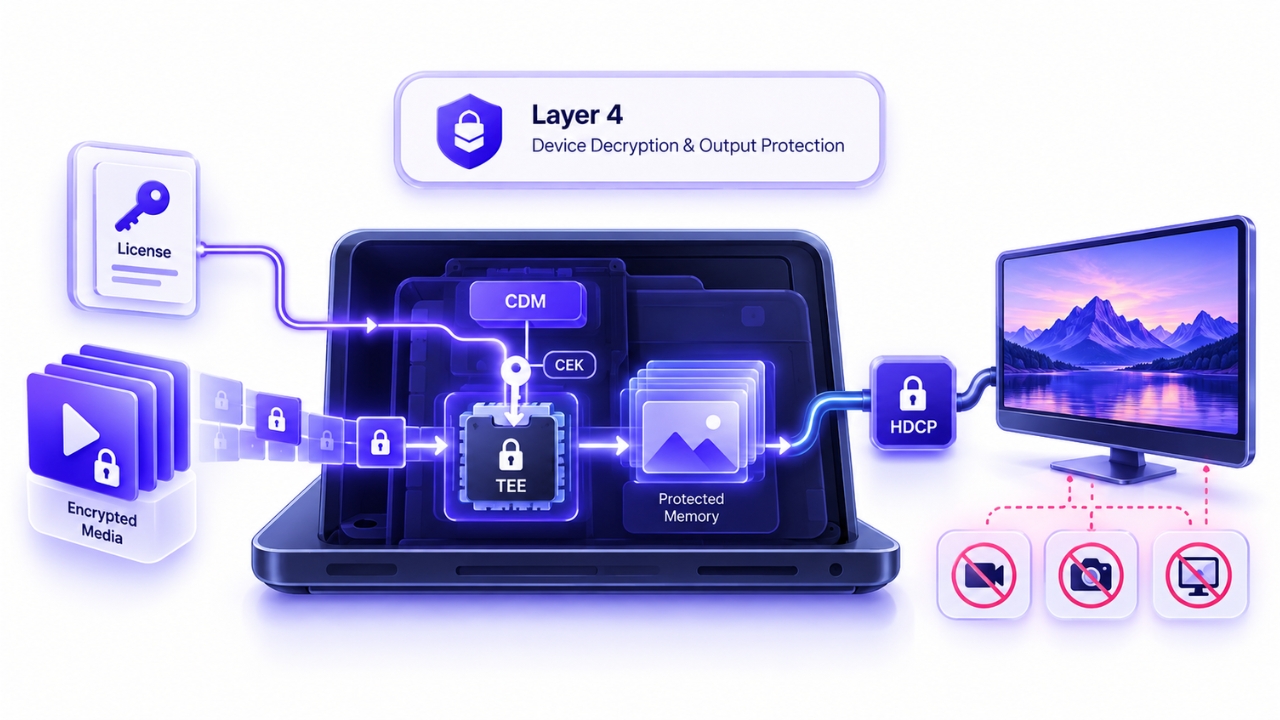
The CDM opens the license using its own private key, recovers the content key, and loads it into a key store. On hardware-backed devices, meaning Widevine L1, PlayReady SL3000 and Apple’s Secure Enclave, that key store is inside the TEE and the CDM only ever holds an opaque handle, never the key bytes. On software levels, Widevine L3 and PlayReady SL2000, the key is protected only by white-box cryptography in ordinary memory.
Encrypted samples are then handed to a secure decryptor, and on hardware levels the decrypted frames land in protected memory that the OS, applications and screen recorders cannot read. Finally, HDCP re-encrypts the decoded video on the physical link to the display, using its own handshake, its own session key and its own cipher.
The Complete Cryptographic Sequence, Start to Finish
| Step | Hop | Operation | Algorithm |
| 1 | Packager | Encrypt samples with the CEK | AES-128-CTR (cenc) or AES-128-CBC with 1:9 pattern (cbcs) |
| 2 | Packager to key server | Exchange CEK, KID and PSSH | CPIX, keys wrapped to a document or public key, document signed |
| 3 | Manifest | Signal KID, scheme and PSSH | Cleartext metadata, no CEK |
| 4 | Client | Detect encryption, encrypt the request | EME generateRequest, CDM builds the request. |
| 5 | Transport | Deliver challenge and response | TLS plus JWT authorization |
| 6 | License server | Authorize the session | Token validation, no content keys involved |
| 7 | TEE or key store | Load the CEK into the key ladder | Hardware-backed key handle on L1 |
| 8 | Display output | Link encryption | HDCP, AES-128-CTR |
The rest of this article takes each mechanism in that sequence and explains what is actually happening cryptographically.
CENC vs CBCS Cryptographic Difference
In CENC, AES-CTR turns the block cipher into a stream cipher: the CEK encrypts a counter block (IV concatenated with a counter), and the resulting keystream is XORed with the plaintext. The 16-byte counter is the per-sample IV. It increments once per 16-byte block and carries across subsamples within a sample. CTR mode allows random access and parallel decryption because any block can be computed independently, historically the reason non-Apple pipelines preferred it.
In CBCS, AES-CBC chains blocks (each ciphertext block feeds the next block’s XOR). The IV is applied to the first encrypted block of each subsample.
Put less formally: CTR mode generates a very long random-looking ribbon of numbers and lays it over the video data. Because any part of that ribbon can be computed directly from a counter value, you can jump to the middle of a segment and start decrypting immediately, and you can decrypt many blocks in parallel on different cores. CBC mode instead links each block to the one before it, like a chain, so it is inherently more sequential. Neither is weaker. They have different performance characteristics, which is why Apple and everyone else initially went different ways.
Where the DRM Encryption Metadata Lives: The ISOBMFF Boxes
For video-on-demand with a single key, the encryption metadata sits in the init segment (moov) and in each fragment (moof):
| Box | Location | What it holds |
| pssh | moov | Protection System Specific Header, opaque per-DRM data, one box per system ID |
| sinf | moov/trak/…/stsd | Protection Scheme Information Box, wraps the original sample entry format |
| frma | sinf | Original format box, records that an encv or enca entry is really avc1 or mp4a |
| schm | sinf | Scheme type (cenc, cbcs and so on) |
| tenc | sinf/schi | Track Encryption Box: default_isProtected, default_Per_Sample_IV_Size (0, 8 or 16), the 16-byte default_KID, plus default_crypt_byte_block and default_skip_byte_block for pattern schemes and default_constant_IV for cbcs |
| senc | moof/traf | Sample Encryption Box: per-sample IVs and the subsample clear and protected ranges |
| saiz and saio | moof/traf | Sample Auxiliary Information Sizes and Offsets, which locate the senc auxiliary data |
| sbgp and sgpd | moof/traf | Sample-to-Group and Sample Group Description, used with a seig entry to override the default KID per group during key rotation |
Encrypted sample entries are renamed from avc1 to encv for video and from mp4a to enca for audio, with the original format preserved in frma. For key rotation, a fresh moof/pssh can carry new keys per crypto period alongside the sbgp and sgpd mapping.
How HLS Signals DRM Encryption
HLS uses the #EXT-X-KEY tag in media playlists, and #EXT-X-SESSION-KEY in the master playlist, with a METHOD attribute:
- AES-128 is legacy whole-segment encryption. The entire transport stream segment, container included, is encrypted. The key is fetched as a raw 16-byte binary file from the URI, and the IV comes either from the attribute or is derived from the media sequence number, per RFC 8216 section 5. This is not CENC and not DRM.
- SAMPLE-AES is sample-level encryption, Apple’s original approach. It uses AES-CBC with clear leaders, roughly 16 bytes clear for AAC and about 32 bytes for AVC in transport streams. This is what FairPlay uses.
- SAMPLE-AES-CTR was introduced by Google and aligns HLS with the CENC cenc scheme.
The important structural point: HLS with fMP4 or CMAF carries the CENC boxes exactly like DASH does. Only legacy HLS with MPEG-TS uses the older SAMPLE-AES transport stream packaging with clear leaders instead of ISOBMFF boxes.
How DASH Signals DRM Encryption
The MPD carries ContentProtection descriptors on each AdaptationSet, a generic descriptor with schemeIdUri set to urn:mpeg:dash:mp4protection:2011 and value set to cenc or cbcs, carrying cenc:default_KID. This marks the content as encrypted and names the key.
Per CMAF and DASH-IF guidance, init segments should not contain a moov/pssh box. PSSH is placed in the MPD instead, for a practical reason: a manifest can be regenerated cheaply, whereas rewriting init segments across an existing library is expensive and cache-invalidating.
Common Misconceptions About DRM Encryption
DRM encryption is just AES-128. The content cipher is AES-128, but essentially all of the security comes from elsewhere: the asymmetric key-delivery handshake using RSA or ECC, the key derivation using AES-CMAC, the TEE key ladder, and HDCP. That is four or more layers, most of which are not AES-128 at all.
The key is in the manifest. The manifest carries the key ID, the IV, the scheme and the PSSH box. Those are pointers and metadata.
cbcs is less secure than cenc. Both use the same 128-bit key and are equally strong. cbcs encrypts less data because of pattern encryption, and that choice is about decoder performance, not about CBC being weaker. cbcs is now the recommended convergence scheme.
If cbcs only encrypts about 10 percent, then 90 percent is watchable. The encrypted blocks are distributed densely enough within each frame that the stream is unplayable without the key. The clear bytes are mostly codec structure, and inter-block and inter-frame dependencies make partial decoding useless.
HDCP is part of the DRM license. HDCP is a separate and independent encryption system operating on the display link. The DRM license only signals the minimum HDCP level that must be present.
Encryption and watermarking do the same job. Encryption prevents unauthorized access. Watermarking identifies who leaked a stream after access was legitimately granted. They are complementary, not alternatives.
Supercharge Your Business with Videos
At VdoCipher we maintain the strongest content protection for videos. We also deliver the best viewer experience with brand friendly customisations. We'd love to hear from you, and help boost your video streaming business.


My expertise focuses on DRM encryption, CDN technologies, and streamlining marketing campaigns to drive engagement and growth. At VdoCipher, I’ve significantly enhanced digital experiences and contributed to in-depth technical discussions in the eLearning, Media, and Security sectors, showcasing a commitment to innovation and excellence in the digital landscape.
Leave a Reply